


-
Get Best Deals on Bundles to Enhance Your Store Capabilities Check All Bundle Discount Extensions
Advanced Size Chart for Magento 2
Display size guides as Popup on product page

Magento 2 Size Chart Extension by MageDelight makes your store more customer-centric by providing a visually appealing and easy-to-understand size chart feature. This powerful extension helps customers select the most suitable products by offering clear and accurate size guides directly on your product pages. With an intuitive popup display, shoppers can quickly reference the size information without leaving the page, making their shopping experience seamless and enjoyable.
-
Marketplace Approved
-
graphQL Compatible
-
REST API Compatible
-
Innovative
- Magento Version Compatibility
- Magento Open Source: 2.4.x
- Adobe Commerce (EE): 2.4.x
- Adobe Commerce Cloud (ECE): 2.4.x

Hyvä is now open-source and free. All MageDelight extensions are already fully Hyvä-ready at zero extra cost to adapt a blazing-fast Hyvä experience with full confidence. to raise a free compatibility request for Hyvä Checkout or Mage-OS.
Your Magento Edition
- Update and support prolongation -
$99/Yr
Pay $149 Now for the first year.
Next year onwards $99 per year to receive updates and support.
You can cancel anytime.
$149
$199
25% OFF
- No Auto-debit setup
- Transparent Policy & No Hidden Fees
- Lifetime Access to Original Source Code
- 1 Year Access to Free Technical Support
- 1 Year Access to Free Compatibility and Feature Updates
- 30 Day Money Back*




Select an option
Product Features
Key Features & Screenshots
Overview & Descriptions
FAQs
Technical Specifications
Release Notes (Changelogs)
What User Speaks (26)
Ask us your query
Product Features
- Display appealing size charts on product pages
- Supports text, HTML code, table, and images
- Create unlimited size charts
- Multiple size chart display options
- Showcase size-charts based on product attributes
- Now compatible with GraphQL
Key Features & Screenshots
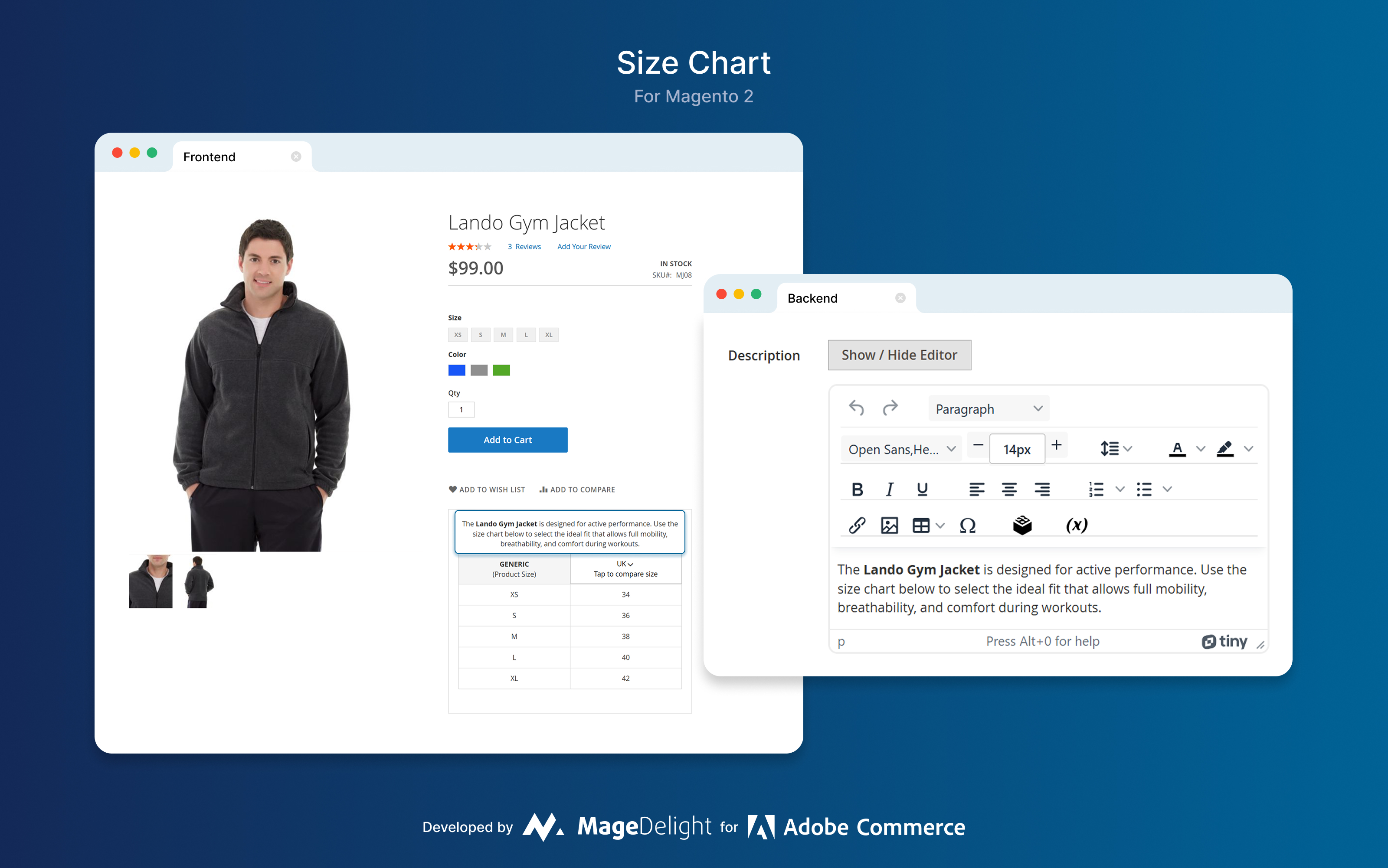
Create Unlimited Size Charts
MageDelight Size Chart Extension for Magento 2 enables you to create unlimited, customizable size charts to suit your business needs. Ideal for apparel, footwear, and other size-specific products, the extension lets you assign unique charts to individual products, categories, or customer groups for a personalized shopping experience. Each chart can be tailored in design and content to match your brand’s style while providing clear, accurate sizing information. By helping customers choose the right fit, it boosts confidence, improves satisfaction, and reduces product returns. With its flexibility and ease of use, it’s a must-have tool for customer-focused online stores.

Multiple Display Options
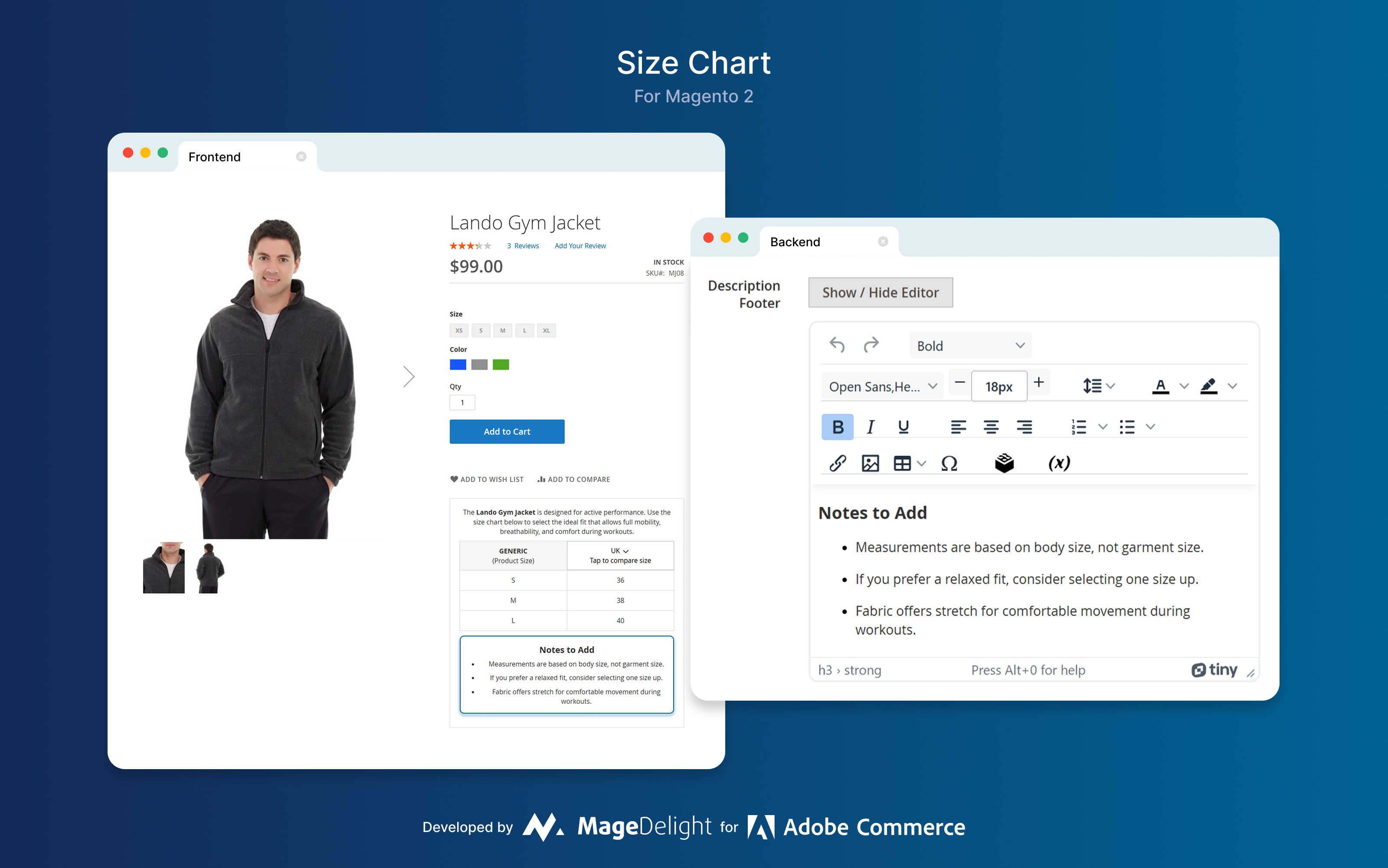
Magento 2 Size Chart Extension gives you flexible and user friendly options to display size charts and enhance your store’s shopping experience. Admin can show size chart directly on product page for instant visibility or show it in a clean separate pop up which can be accessed by a click-able link. This flexibility allows you to keep your design clean and still give customer easy access to sizing information. By providing intuitive and accessible size guides you help customer to make confident purchase decisions, reduce sizing confusion, reduce product returns and overall customer satisfaction and trust.

Develop Size Charts Apt for Your Business
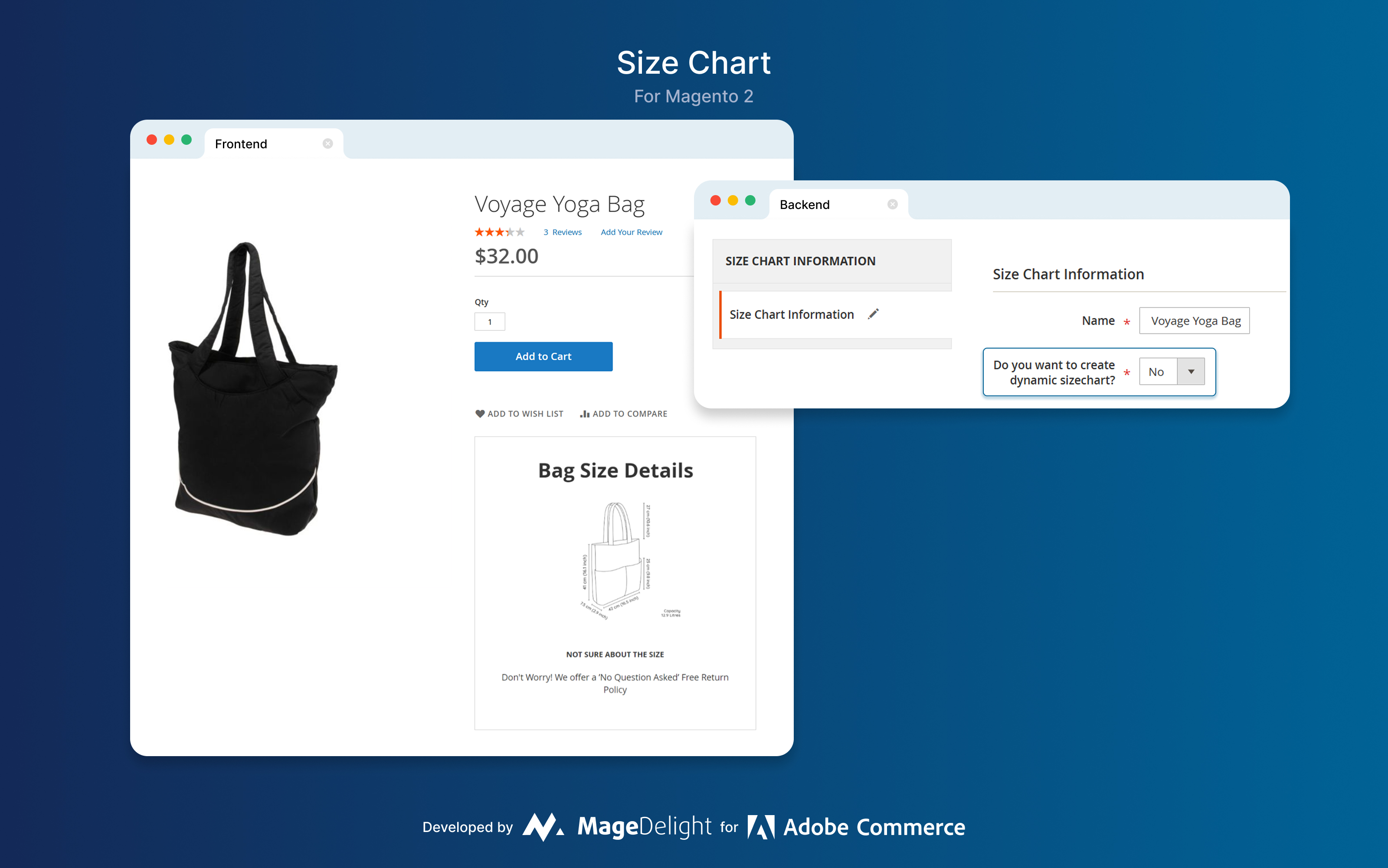
Design visually appealing and unique size charts using our Magento 2 Size Chart Module that truly stand out by incorporating images, tables, text, or even custom HTML code. This flexibility allows you to create informative and branded size guides that align perfectly with your store’s design and customer expectations. Once you’ve crafted the ideal size charts, assigning them is simple — you can link them to individual products, entire categories, or specific customer segments, all based on your business needs. By offering clear, attractive, and well-organized size information, you help customers make confident buying decisions, enhance their shopping experience, and reduce the likelihood of returns.

Display Size Charts Based on Product Attributes
Admins can leverage product attributes to control when and where size charts appear across the store. By configuring specific product attributes, you can determine which products will display a size chart, ensuring that the guides are shown only where relevant. Additionally, you can combine multiple product attributes to create even more precise rules for showcasing size charts, such as displaying them only for certain categories, materials, or customer groups. This powerful feature helps you efficiently filter and manage the visibility of size charts, keeping your product pages clean, relevant, and tailored to your customers’ needs.

Overview of Our Magento 2 Size Chart Extension
When it comes to clothes, shoes and other such accessories, customers find it hard to presume the right fit for them as there are countless different measuring scales, systems – different for men and women. This is not all, sizes even vary from brands to specific vendors. Ultimately, this makes it very difficult for online buyers to determine whether a certain product will fit them right or not – if they are not provided with a reference chart with size and scale explicitly mentioned on it. In order to help store owners overcome this challenge, we have developed perfect Size Chart extension for Magento 2.
MageDelight Magento 2 Size Chart Popup Module will help you design visually appealing size charts that will enable your customers to presume the right-sized product for them. Providing your buyers an accurate idea about the measurement of certain products will give them the confidence to invest their resources on it. Ultimately, this will help you maximize conversions and grow your business exponentially.
Who Needs a Size Chart Extension for Magento 2?
Any Magento 2 store selling products where fit or measurement matters. The most common use cases:
- Fashion and apparel stores (t-shirts, jeans, dresses, activewear)
- Footwear (shoe size varies by brand, country, and gender)
- Children's clothing (where parents rely heavily on age/weight ranges)
- Accessories (belts, hats, gloves, jewelry with ring sizes)
- Sports equipment (helmets, pads, compression gear)
- Industrial workwear and PPE (where fit affects safety)
If you sell any of these categories and your return rate is above 10-15%, a size chart is one of the cheapest, fastest fixes available.
How It Works: Setup in 4 Steps
Step 1: Install the extension via Composer or manually upload to your Magento 2 root. Run setup:upgrade and clear cache. MageDelight handles this for you if you take the free installation option.
Step 2: Go to Catalog > Size Charts in your Magento admin. Create a new size chart. Use the WYSIWYG editor to build your table -- add columns for chest, waist, hips, and any other measurements your products need.
Step 3: Assign the chart. You can assign it to a single product, a product category, or set conditions to apply it automatically (e.g., all products with the attribute 'clothing_type = tops').
Step 4: Choose your display mode. Set popup, inline, or tab from the configuration. Preview on the storefront. Done.
Most stores are live with a working size chart within 30 minutes of installation.
Benefits of Size Chart Extension for Magento 2
- Easy to find the right product
- Clear size charts offered visually
- Get precise instructions to find right size
- Enhance the overall shopping experience
- Enable your customers easily determine the right-sized product
- Boost your customer’s trust and confidence
- Reduce return requests by explicitly providing product scale and size upfront
For Admin
- Create unlimited size charts
- Display size chart on product page or in pop-up
- Supports text, HTML code, table, and images
- Showcase size-charts based on product attributes
- Plug and play extension with an intuitive UI
- Now compatible with GraphQL
- Ability to change size chart label icon
For Customer
- Easy to find the right product
- Clear size charts offered visually
- Get precise instructions to find right size
MageDelight vs. Competitors
| Feature | MageDelight | Mageplaza | Amasty | Magezon |
| Display modes | Popup | Popup | Popup | Popup, inline |
| Pre-made templates | Custom builder | 6 ready templates | 6 ready templates | Custom builder |
| Unit conversion (cm/in) | Yes | No | No | Yes |
| Hyvä-ready | Yes, free | Paid add-on | Paid add-on | No |
| GraphQL support | Yes | Yes | No | No |
| Free installation | Yes | No | No | No |
How Size Chart Extension for Magento 2 is Beneficial for you?
Sizing charts are one of the best ways to avoid returns caused by size issues — but the cost of getting it wrong is higher than most store owners realize. Re-shipping, restocking, potential damage to the item, and customer support time all add up. Industry data from Narvar and Shopify puts the total cost of a single return between $15 and $30 after factoring in labor and logistics.
Size-related returns are particularly painful because they're avoidable. A customer who buys the wrong size didn't make a mistake because your product is bad. They made it because the information wasn't there when they needed it. Adding a clear size chart with measurement instructions, not just S/M/L labels, consistently reduces size-related returns by 20-30% for apparel stores.
MageDelight's Magento 2 size chart extension helps store owners fix this directly on the product page. With a visually engaging size guide, customers choose the right fit with confidence before they buy, not after. The result is fewer returns, lower operational cost, and a better shopping experience that keeps customers coming back.
Did you find what you were looking for?
Your Question
Technical Specifications
Dev Environment Required: Click Here
- Magento OS: 2.4.8-p3 and above (or latest)
- Adobe Commerce: 2.4.8-p3 and above (or latest)
- Adobe Commerce Cloud: 2.4.8-p3 and above (or latest)
- JavaScript must be enabled in browsers.
- Supported Browsers: Click Here
- PHP Compatibility: Click Here
- Required extensions: Click Here
- Safe_mode off.
- Memory_limit no less than 4Gb (preferably 8GB).
- Max Execution time no less than 90 seconds.
Operating System:
- Magento recommends to use Linux operating system for development. It may have few problems with windows/other operating system.
Dev & Test Environment:
MageDelight has below development environment.
- Standard Vanilla Magento (Open Source) version 2.4.8-p3 and above & up to latest version
- Standard Vanilla Adobe Commerce version 2.4.8-p3 and above up to latest version
- Standard Vanilla Adobe Commerce (Cloud) version 2.4.8-p3 and above up to latest version
- Theme: Magento Luma (Default)
Magento Compatibility:
- We provide 100% compatibility with standard/vanilla Magento with supported editions and versions
3rd Party Compatibility:
-
You may need some minor fixes to work with other 3rd party themes and extensions.
-
We do not guarantee that the extension will function with other third-party themes or extensions because we have not tested it with your third-party themes or extensions, so if you require some minor code compatibility with your third-party themes or extensions, please contact us. We will surely assist in resolving issues caused by code conflicts if it requires less efforts (up to two hours). If it will need a significant amount of time and effort (more than four hours of development), it will be evaluated for paid development support. Third-party modules or themes are those that are not produced or given by Magento/Adobe and are sold by other vendors/developers.
-
On-Demand Custom Features Development
-
The features mentioned on the description comes as standard extension features. Apart from this if any of the features you require for your business requirements will be considered as bespoke development and it will be considered as additional development on top of extension features.
Release Notes & Changelogs
Version number:
1.1.9
|
Magento v2.4.8 Compatibility
- Stability: Stable
- Compatibility: Magento Community-2.4, Magento Enterprise-2.4
- Verified and ensured compatibility with Magento Open Source 2.4.8
- Verified and ensured compatibility with Adobe Commerce 2.4.8
- Verified and ensured compatibility with Adobe Commerce Cloud 2.4.8
- Added support for PHP 8.4
Version number:
1.1.8
|
Bug Fixes
- Stability: Stable
- Compatibility: Magento Community-2.3, Magento Enterprise-2.3, Magento Community-2.4, Magento Enterprise-2.4
- Enable the option to edit existing country selections
- Optimize the code to ensure compatibility with PHP Mess Detector (PHPMD)
Version number:
1.1.7
|
Feature Enhancement and Bug Fixes
- Stability: Stable
- Compatibility: Magento Community-2.3, Magento Enterprise-2.3, Magento Community-2.4, Magento Enterprise-2.4
- Compatibility with the Hyvä theme has been added
- The ACL issue has been resolved.
Version number:
1.1.6
|
Functional Compatibility
- Stability: Stable
- Compatibility: Magento Community-2.3, Magento Enterprise-2.3, Magento Community-2.4, Magento Enterprise-2.4
- Compatibility with Magento 2.4.7
- Compatibility with PHP 8.3
Version number:
1.1.5
|
PHP8 Compatibility
- Stability: Stable
- Compatibility: Magento Community-2.3, Magento Enterprise-2.3, Magento Community-2.4, Magento Enterprise-2.4
- - PHP 8 Compatibility
Version number:
1.1.2
|
Compatibility
- Stability: Stable
- Compatibility: Magento Community-2.3, Magento Enterprise-2.3, Magento Community-2.4, Magento Enterprise-2.4
- - Compatible with Magento 2.4.x
Version number:
1.1.1
|
New License Policy Release
- Stability: Stable
- Compatibility: Magento Community-2.2, Magento Enterprise-2.2, Magento Community-2.3, Magento Enterprise-2.3
- - Release with updated license policy
Version number:
1.1.0
|
Enhancement
- Stability: Stable
- Compatibility: Magento Community-2.2, Magento Enterprise-2.2, Magento Community-2.3, Magento Enterprise-2.3
- - Added query language GraphQL
Version number:
1.0.0
|
New Release
- Stability: Stable
- Compatibility: Magento Community-2.2, Magento Enterprise-2.2, Magento Community-2.3, Magento Enterprise-2.3
- New Release
😊 Review Summary by AI
😊
Overall Positive Sentiment
The Size Chart extension by MageDelight receives overwhelmingly positive reviews for its ease of use, effective functionality, and ability to enhance customer experience. Users praise its simple setup, elegant design, and flexibility, which help reduce returns and increase sales. The product's reliable performance, well-documented features, and excellent support team contribute to high satisfaction. Overall, it is regarded as a valuable, user-friendly tool that improves store usability, boosts customer confidence, and adds significant value for online retailers seeking a seamless sizing solution.
What Customer Loved
- Easy to set up (2)
- Easy to use and install (1)
- Works great out-of-the-box (1)
- Lightweight and useful extension (1)
- Elegant size charts displayed on the front-end (1)
What Could Be Better
- No negative aspects mentioned (7)
- No criticisms provided (6)
- None mentioned (3)
- No negative aspects noted (2)
- Limited feedback on potential improvements (1)
Customer Reviews
Only registered users can write reviews. Please Sign in or create an account
Overall Ratings
Great Size Chart Extension for Magento 2
|
Review by
jorja latour
June 18, 2026
Functions as Described
4
Developer Support
5
Usefulness
5
Overall Rating
5
I have been using this Size Chart extension, and it has made size selection much easier for my customers. The setup is simple, customization options are excellent, and it helps reduce returns while improving customer confidence.
Truly Versatile Extension
|
Review by
Grace
November 2, 2021
Overall Rating
5
Usefulness
4
Functions as Described
5
Developer Support
5
Size Chart is a truly versatile extension. I loved all its features and especially its UI. Overall, a double thumps-up!
Features go beyond expectation
|
Review by
Krystina
October 14, 2021
Overall Rating
5
Usefulness
4
Functions as Described
5
Developer Support
5
The features of this extension go way beyond expectations, really loved it.
Game Changer!
|
Review by
Stephan
September 30, 2021
Overall Rating
5
Usefulness
4
Functions as Described
5
Developer Support
5
Exactly what we needed. The extension has all the right features we were looking for. Double thumbs up for the MageDelight support team.
A Must-Have Extension
|
Review by
Karla
September 17, 2021
Overall Rating
5
Usefulness
4
Functions as Described
5
Developer Support
5
Size Chart is a must-have extension for apparel online stores. it was quick to set it up & start using it. I'm totally satisfied with this product.
Useful module
|
Review by
Prissy
September 16, 2021
Overall Rating
5
Usefulness
4
Functions as Described
5
Developer Support
5
It is a useful module for customers and reduces the chances of returns and exchanges.
Useful Module
|
Review by
Max
August 11, 2021
Overall Rating
5
Usefulness
4
Functions as Described
5
Developer Support
5
Size Chart is a useful module by MageDelight. It is very simple to set up and manage.
Satisfactory results
|
Review by
Alistair
August 11, 2021
Overall Rating
5
Usefulness
4
Functions as Described
5
Developer Support
5
The extension brought in highly satisfactory results. I love the performance.
Makes shopping easier
|
Review by
Zibby
July 5, 2021
Overall Rating
5
Usefulness
4
Functions as Described
5
Developer Support
5
This makes it a lot easier for customers to choose the right product. My customers are loving it.
Simple but Effective
|
Review by
Leo
June 7, 2021
Overall Rating
5
Usefulness
4
Functions as Described
5
Developer Support
5
This is a simple but very effective extension that helps to improve the overall shopping experience for customers. I highly recommend it to everyone.
Ask us your query
Request for a new feature, a custom change, or a question about a feature
People also search for
Magento 2 Size Chart Extension
Magento 2 Size Chart Module
Magento 2 Size Guide
Advanced Size Chart for Magento 2
$149
$199
25% OFF