


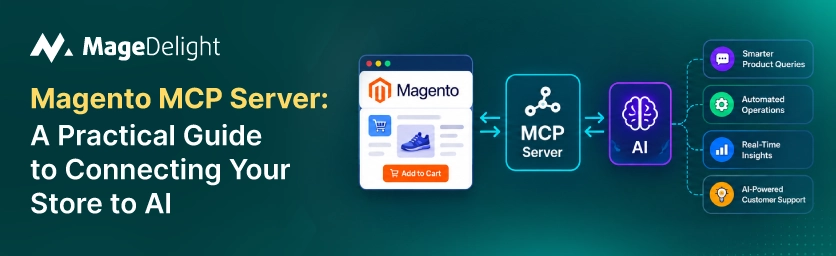
Ask an AI assistant to check your Magento store's stock levels or recent orders today. The honest answer is that it can't do it directly. You would export a report and upload a CSV. Hope the data isn't already stale by the time the assistant reads it. The Model Context Protocol, a standard that Anthropic introduced in November 2024, exists to close that gap. Of a one-off file upload, MCP gives an AI assistant a standardized live connection to your store's actual data and actions.
For Magento, that connection matters more than it does for some other platforms. Magento's flexibility has historically meant every AI integration was a custom development job. MCP changes that by giving Magento merchants a way to plug into the broader AI ecosystem- Claude, ChatGPT, Cursor, and others without rebuilding the integration from scratch for each one.
This guide covers what MCP actually is, how a Magento MCP server works under the hood, what tools are realistically available today, how to set one up, and what to lock down before you let an AI assistant anywhere near your storefront.
What Is MCP (and Why It Matters for Magento)
The Model Context Protocol solves what's sometimes called the M×N problem: M different AI models multiplied by N tools and data sources equals M×N separate custom integrations to build and maintain. Before MCP, connecting an AI model to a system, a database, an API, or a file store meant writing bespoke glue code for every single pairing.
MCP replaces that with one protocol. An MCP server exposes a system's capabilities in a format; any MCP-compatible AI client can then use those capabilities without needing custom code for that specific combination. Under the hood, MCP servers expose three kinds of primitives to an AI model:
• Tools: functions the AI can call to perform an action like querying an order or applying a discount.
• Resources: file- structured data the AI can read, such as a product catalog export or a sales report.
• Prompts: predefined templates that guide how the AI interacts with a given system.
Communication runs on JSON-RPC 2.0 over either stdio for servers running as a subprocess (common for developer tools) or HTTP with Server-Sent Events for remote cloud-deployed servers. Neither the protocol nor its adoption is limited to Claude; MCP is a standard, and by 2026 multiple AI platforms and model providers have adopted or evaluated it, making it genuinely cross-platform infrastructure rather than a single-vendor feature.
How a Magento MCP Server Actually Works
A Magento MCP server sits between your Magento instance and an MCP-compatible AI client. For a manager exporting sales data to a spreadsheet and uploading it to a chat window, the AI calls the server's tools directly and gets live data back in the same conversation. In practice, the server module authenticates against your Magento REST API using OAuth or admin credentials and exposes a defined set of tools grouped by entity (sales, catalog, customers, CMS). Enforces whatever access rules the module defines, often read-only by default.
The practical effect: instead of asking a colleague to run a report, you ask the AI assistant directly, and it queries the store in real time rather than working from a file that was accurate an hour ago.
What You Can Do With a Magento MCP Server
The specific tool set depends on which server implementation you run, but the categories that show up across the current options are fairly consistent:
• Sales queries: access orders, invoices, returns, and abandoned carts, including aggregated summaries like revenue by date range.
• Catalog management: search, review, and in some implementations edit products, categories, and attributes through natural language.
• Promotions and pricing: review or adjust active promotions, with built-in guardrails like price-change warnings on more mature servers.
• CMS content: query or update CMS blocks and pages without opening the admin panel directly.
• Diagnostics: surface store health information, such as performance or configuration issues, in response to a plain-language question.
The capable open-source servers add operational safeguards on top of raw access: a two-phase commit pattern for bulk operations (prepare, review, then commit), scope handling across multiple stores and websites, and audit logging that records every action with a timestamp, user, and parameters. Those guardrails matter as much as the feature list when you're deciding what to actually enable.
Available Magento MCP Server Options
MCP for Magento is still an early, fast-moving ecosystem rather than a single official Adobe product, so most current options come from the open-source community. Here's how the more visible ones compare:
|
Server |
Access Level |
Key Feature |
Auth Method |
|
Freento MCP Server |
Read-only |
Sales, catalog, and stock queries via natural language |
API key / module config |
|
thomastx05/magento-mcp |
Read + write (30+ tools) |
Catalog edits, promotions, CMS, diagnostics with two-phase commit for bulk actions |
OAuth 1.0 (HMAC-SHA256) |
|
boldcommerce/magento2-mcp |
Read + write |
One of the more mature open-source starting points for custom builds |
Varies by deployment |
|
Zapier MCP for Magento |
Action-based |
Routes through Zapier's broader automation and app ecosystem |
Zapier account auth |
None of these is an official Adobe release, so treat version history, maintenance activity, and open issues on each project's repository as part of your evaluation, not just the feature list.
How to Set One Up (Step by Step)
1. Generate Magento API Credentials
Most Magento MCP servers authenticate through the Magento REST API. In your Magento Admin, create a new integration under System > Extensions > Integrations, or generate an admin token if the server you've chosen supports that method instead. OAuth 1.0 integration credentials are the more common and more secure route, since they avoid handling raw admin passwords.
2. Install and Configure the Server
For a Node-based server, this typically means cloning the repository, running the build, and configuring your MCP client (Claude Desktop, Cursor, or another MCP-compatible tool) to launch it. A typical configuration block looks like this:
{
"mcpServers": {
"magento-mcp": {
"command": "node",
"args": ["path/to/magento-mcp/dist/index.js"],
"env": {
"MAGENTO_BASE_URL": "https://your-store.com",
"MAGENTO_OAUTH_CONSUMER_KEY": "your_consumer_key",
"MAGENTO_OAUTH_CONSUMER_SECRET": "your_consumer_secret",
"MAGENTO_OAUTH_TOKEN": "your_access_token",
"MAGENTO_OAUTH_TOKEN_SECRET": "your_access_token_secret"
}
}
}
}
3. Authenticate and Test
Once the server is running, most implementations require a login call before any tool becomes available. From there, test with a risk read-only query first. A product search or an order lookup, before enabling anything that writes back to the store.
4. Start With a Narrow Use Case
Rather than enabling every available tool on day one, pick one use case with a fast visible return. Order status lookups and low-stock alerts tend to show the payoff because they're read-only, low-risk, and immediately useful to a support or operations workflow.
Security: What to Lock Down Before You Connect AI to Your Store
MCP's power is exactly what makes it a security surface worth taking seriously. The protocol lets an agent act across your systems, not just talk about them, so the standard advice applies here directly: connect deliberately, and secure the connection before you scale up what it's allowed to do.
• Default to read-only: Most Magento MCP servers ship with read-only tools by default; only enable write access for the specific tools a given use case actually needs.
• Use OAuth over admin passwords: OAuth 1.0 integration tokens can be scoped and revoked independently of your admin login, and they avoid exposing 2FA-protected credentials to an automated process.
• Require confirmation on bulk or destructive actions: A two-phase commit pattern, prepare then confirm, prevents a single ambiguous instruction from executing an irreversible bulk change.
• Keep an audit log: Every tool call should be logged with a timestamp, the acting user or credential, and the parameters passed, so you can reconstruct exactly what an AI assistant did if something goes wrong.
• Scope access per store view: On a -store Magento instance, explicitly restrict which websites and store views a given integration can touch rather than granting blanket access.
If your team doesn't have the in-house capacity to vet or harden an open-source MCP server before connecting it to a production store, that's a case for custom Magento extension work rather than deploying an unmodified community project directly against live customer data.
Where MCP Fits in the Bigger Agentic Commerce Picture
Most people tracking this space describe adoption in phases. The current phase is largely read-only: basic MCP servers handling product search, order tracking, and inventory queries through chat interfaces. The next phase, already underway through 2026, moves toward multiple specialized agents, catalog, pricing, marketing, customer service, sharing context through MCP to coordinate more complex workflows. A further-out phase points toward more autonomous agentic commerce, where AI agents execute multi-step workflows and adjust operations with less direct human involvement at each step.
Where any individual Magento store actually is on that curve matters more than where the industry is heading in aggregate. A store just getting started with MCP should treat phase one, read-only queries with a narrow, well-audited tool set, as the entire scope for now, not a formality to rush past.
For merchants evaluating this alongside AI-driven storefront features, it's worth browsing what's already available as packaged extensions rather than building everything from a raw MCP server. MageDelight maintains a category of AI-powered Magento 2 extensions that covers some of this ground without requiring a custom integration project.
Getting Started Without Overcommitting
The realistic starting point for Magento merchants is a single well-scoped read-only use case, not a full agentic overhaul. Pick one workflow order status or inventory lookups as the first choice. Connect it through OAuth with a narrow tool set and add audit logging before you expand scope. The protocol itself is mature enough to build on; the guardrails around how access you grant it are what still deserve the most attention.
If you're weighing whether to build a custom MCP integration in-house or bring in help, a conversation with a Magento development team that's already worked with API-level integrations is generally faster than starting from an open-source repository, with no prior Magento REST API experience.
Frequently Asked Questions
Is MCP exclusive to Claude?
No. MCP is a standard that Anthropic created and maintains, but it was designed for broad adoption and multiple AI platforms and model providers now support it. Any MCP-compatible client, not Claude, can connect to a Magento MCP server.
Do I need to be a developer to set this up?
Configuring an existing open-source Magento MCP server requires comfort with environment variables, API credentials and basic Node.js tooling, which puts it in developer or inclined admin territory rather than a point-and-click setup. Customizing tool behavior or building server-side guardrails is a development task.
Is an Adobe MCP server available?
As of this writing, Magento MCP servers are community and third-party projects rather than an official Adobe Commerce product. Evaluate maintenance activity and security practices on a per-project basis rather than assuming Adobe-level support.
What's the difference between MCP and a regular API integration?
A traditional integration is custom code written for one pairing of a system and a consumer of that system. MCP standardizes the interface so the server works with any MCP-compatible AI client, which is what removes the need to rebuild the integration for every new AI tool you want to connect.
