


Forrester Research says about half of sales are lost because people can't find what they need. For B2B catalogs, where one distributor might have tens of thousands of items across technical areas, this problem is built into the system, not just a small issue. The way you organize your site, whether with a category tree or a wide mega menu, decides if someone looking for a 3/8-inch stainless hex bolt finds it in two steps. Gives up after five tries.
This isn't a choice between the two for most big B2B catalogs. It's about which model does most of the work and which one supports it. The following is how to think about this split for B2B, where the number of items and technical details make things different from a 200-product B2C store.
Why B2B Catalog Navigation Breaks Differently Than B2C
B2B catalogs have more than just basic categories, and buyers act differently than regular shoppers. People in industries like medical and technology often need to search by size, compatibility, certifications, or part numbers rather than just looking by style or price. A person looking for a GSA fastener isn't just browsing. They are making a planned purchase, and every extra step between them and the product is a problem with real costs.
The problem gets worse with items. Platforms that work well with 1,000 items start to struggle after 10,000. Page load times get longer, database queries get slower, and a navigation system that worked before starts hiding products instead of showing them. B2B sellers and wholesalers usually have catalogs in that range or bigger, making the navigation choice a performance problem as much as a user experience one.
Category Tree: Built for Depth
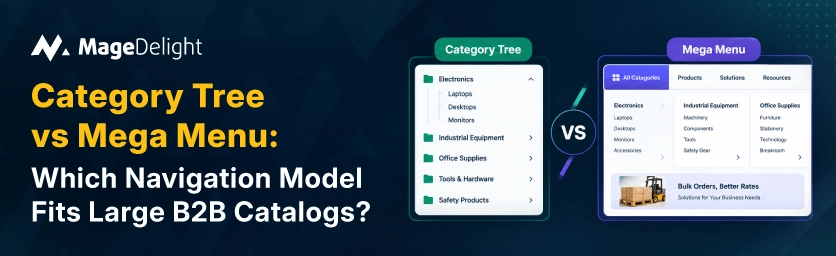
A category tree organizes products into a strict hierarchy, broad departments branching into subcategories, then into specific product types, then down to individual SKUs. It's the right default for catalogs with genuine, meaningful hierarchy, where a department, a subcategory, and a product type are actually different things a buyer thinks about separately, not just different labels for the same flat list.
• Scales cleanly as SKU count grows, since new products slot into existing branches without redesigning the navigation itself.
• Gives search engine crawlers a clear, structured link path when each level uses real, crawlable HTML links, which directly supports indexation and crawl budget efficiency on large catalogs.
• Requires breadcrumbs to stay usable at depth. Deep hierarchies risk making buyers lose their sense of place within the site, and breadcrumbs become close to mandatory once you're three or more levels deep.
• Weakness: pure category browsing is slow for a buyer who already knows what they want. Multiple clicks through hierarchy levels is friction if the buyer's real need is a fast lookup, not exploration.
Mega Menu: Built for Breadth and Recognition
A mega menu surfaces multiple columns of categories, and sometimes featured products or promotional content, in a single panel a buyer can scan without navigating deeper. It's worth implementing once you have more than roughly four subcategories under a primary category, or when visual hierarchy helps buyers orient within a large structure at a glance rather than clicking through it level by level.
• Faster for buyers who recognize a product line or use case on sight, since broad categories are visible in one interaction instead of several.
• Breaks down past a certain complexity: more than three columns or twenty-plus links per panel, and most guidance agrees the menu stops being scannable within the roughly three-second window a shopper actually gives it.
• Carries real crawlability risk at scale. Column layouts frequently hide links behind JavaScript hover states or dynamically injected DOM elements, and liquid-rendered menus are crawlable while many JavaScript app-driven menus are not.
• Every page of the site has this problem, not one section. This makes the issues with performance. How search engines see the site is worse across the whole catalog.
Side-by-Side Comparison
|
|
Category Tree |
Mega Menu |
|
Best catalog size |
Deep hierarchies, thousands of SKUs, dozens of subcategories |
Moderate breadth, roughly 20–200 top-level groupings |
|
Maintenance as SKUs grow |
Scales cleanly; new products slot into existing branches |
Requires manual curation to avoid an overloaded panel |
|
Discovery speed for known items |
Slower; multiple clicks through hierarchy levels |
Faster; broad categories visible in one interaction |
|
Best for buyers who... |
Know the general category but not the exact SKU |
Recognize the product line by name or use case on sight |
|
Crawlability risk |
Low, if built with real HTML links at each level |
Higher; column layouts often hide links behind JS or hover state |
|
Pairing requirement |
Needs strong faceted filtering at the leaf level to be usable |
Needs disciplined content curation to avoid becoming unscannable |
The Real Answer: Layer Them, Don't Choose One
For B2B catalogs, the best way is a mix: a mega menu or a simple top-level menu helps with the first step or two, showing broad areas while a category tree with filtering by attributes handles the rest. The mega menu answers "where do I start," and the layered navigation answers "which exact one of these 4,000 items do I need."
This split is more important at B2B size because the filtering part carries more weight. A B2B buyer using filters for material, certification, voltage, or supplier is doing something like buying in bulk rather than just looking around. This filtering needs to work no matter how they got to the category in the first place.
This is where a standard Magento category page usually doesn't work well for B2B. By default, Magento's filtering handles attribute choices, but big technical catalogs need advanced choices like hiding some options until others are picked using AJAX so the page updates without a full reload and sliders for numbers like voltage or size. MageDelights Advanced Layered Navigation extension adds this to either navigation system, letting buyers use filters set up how they connect and see changes instantly.
The SEO Layer Most Comparisons Skip
Whichever model you lead with, the SEO mechanics underneath it matter more at B2B scale, simply because there are more pages at stake. A few rules hold regardless of which navigation model carries the primary weight:
• Every navigational link, category tree, or mega menu needs a real anchor tag with a real href present in the initial HTML. CSS can hide it visually; JavaScript should never be the only thing that creates it.
• Faceted filters create a lot of URLs. Use tags to point to the main page and noindex the other versions to save the search engines time.
• Breadcrumbs are not optional when the site is deep. They help buyers go back and help search engines understand the site's structure.
• Don't use a structure where everything is just one click from the home page. It looks simple. Confuses search engines about what pages are important.
Match the Model to How Buyers Actually Search
There's no single correct answer between a category tree and a mega menu for a large B2B catalog, because they solve different parts of the same problem. The category tree gives your catalog structural integrity and crawlability at scale; the mega menu gives returning buyers a fast, recognizable entry point. Neither one, on its own, solves the harder problem of letting a buyer narrow 4,000 SKUs down to the one they actually need. That's the job of the filtering layer sitting underneath both.
If your current category pages are relying on Magento's default filtering to carry that weight, it's worth auditing whether Advanced Layered Navigation closes the gap, particularly for dependent attribute filtering and AJAX-based results on high-SKU category pages.
Frequently Asked Questions
At what SKU count should a B2B store stop relying on category tree alone?
No exact number works. Many sites start to struggle once they have more than 10,000 items without good filtering. When things like material, certification, and compatibility become the way buyers find what they need, layered navigation is no longer optional. It becomes part of the search process.
Does a mega menu hurt SEO more than a category tree?
Not inherently, but it carries more risk in practice, since mega menu implementations more frequently rely on JavaScript-driven hover states that hide links from crawlers. A category tree built with nested, real anchor tags at every level is generally the safer default for crawlability, provided the mega menu (where used) is also built with genuine HTML links rather than script-only interactivity.
Should B2B navigation prioritize category browsing or search?
Search deserves at least equal weight for B2B specifically. Buyers who type a part number or exact specification are expressing explicit purchase intent, and optimized site search commonly converts several times better than menu-driven navigation for that segment of buyers. Category tree and mega menu should be treated as complements to strong search, not a replacement for it.
Is faceted navigation necessary if the category tree is deep enough?
Yes, always at real B2B size. Even an organized deep structure still leaves buyers looking at a long list of similar items at the bottom. Filters by material, size, brand, and technical details are what help them find the item without more steps.
