



What is a Wishlist?
Wishlist - The word itself says a lot. The ecommerce store wishlist is just a list of products we wish to buy. An online store wishlist is a feature that allows visitors to save an item for future purchases. In most of the online stores utilized recently, the wishlist is represented as a star symbol.
Why Disable Wishlist? The Conversion Impact
Wishlists can be double-edged swords for eCommerce stores. While they help customers save favorite items, research shows:
-
Stores with limited inventory see 12-18% lower conversions with wishlists enabled (Source: Baymard Institute)
-
73% of wishlist items are never purchased (SaleCycle 2023 Report)
-
Mobile users are 3x more likely to abandon carts when wishlist options are prominent
Key reasons to disable:
-
Reduces distractions from primary CTAs (Add to Cart/Buy Now)
-
Prevents price comparison behavior
-
Simplifies the purchase path
-
Ideal for stores with fast-moving inventory
Otherwise, having a Wishlist feature might be a loss for your store.
How To Remove or Disable The ‘Add To Wishlist’ Button In Magento 2?
Method 1: Disable via Admin Panel (No Coding)
- In order to remove the 'Add to Wishlist' button, follow the below steps:
- Log in to admin panel
- Navigate to Stores > Configuration
- Go to Wishlist under Customers
- Expand the General Options
- Set the option of Enabled to “No“
- Save the configuration
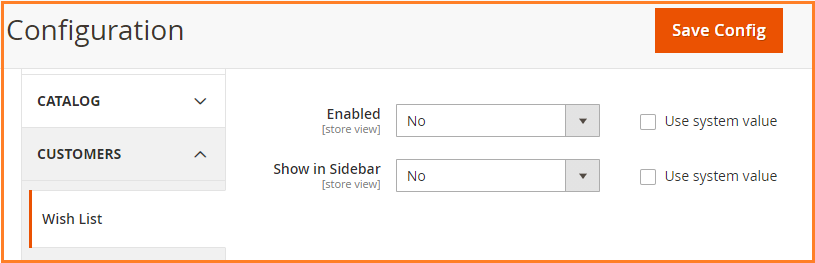
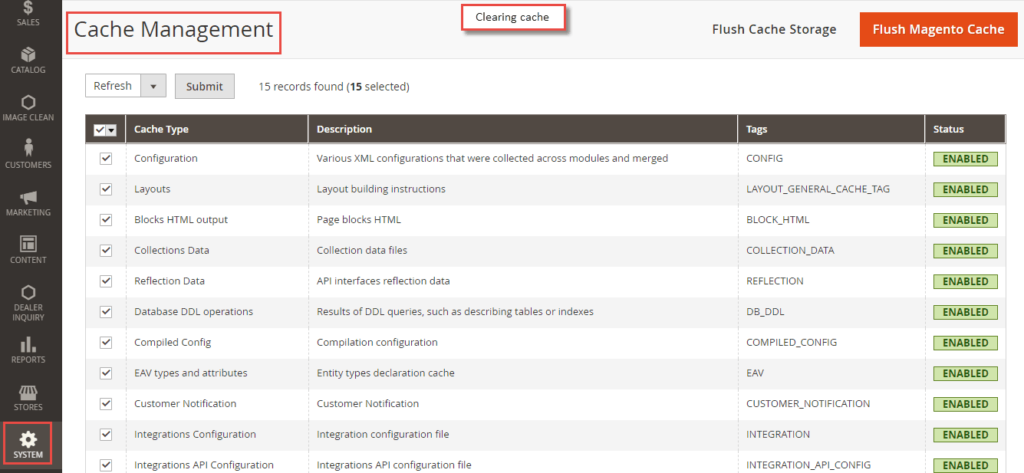
Don’t forget to clear the cache!
- Go to System > Cache Management.
- Use mass action to select all and refresh
Click submit - It's done!
Method 2: Remove via XML Layout Update
And if you want to do this programmatically, here is the code:
A. Remove from Product Page
<!-- app/design/frontend/[Vendor]/[Theme]/Magento_Catalog/layout/catalog_product_view.xml -->
<page xmlns:xsi="http://www.w3.org/2001/XMLSchema-instance">
  <body>
    <referenceBlock name="product.info.addto" remove="true"/>
  </body>
</page>
B. Remove from Category Listings
<!-- app/design/frontend/[Vendor]/[Theme]/Magento_Catalog/layout/catalog_category_view.xml -->
<page xmlns:xsi="http://www.w3.org/2001/XMLSchema-instance">
  <body>
    <referenceBlock name="category.product.addto.wishlist" remove="true"/>
  </body>
</page>
C. Remove Sidebar Widget
<!-- app/design/frontend/[Vendor]/[Theme]/Magento_Wishlist/layout/default.xml -->
<page xmlns:xsi="http://www.w3.org/2001/XMLSchema-instance">
  <body>
    <referenceBlock name="wishlist_sidebar" remove="true"/>
  </body>
</page>
Post-Update Steps:
php bin/magento setup:upgrade
php bin/magento setup:static-content:deploy -f
php bin/magento cache:flush
Method 3: Advanced PHP Plugin Solution
Step 1: Create Plugin
<?php
namespace [Vendor]\[Module]\Plugin;

class DisableWishlistPlugin
{
    public function aroundIsAllow(\Magento\Wishlist\Helper\Data $subject, callable $proceed)
    {
        return false;
    }
}
Step 2: Register Plugin
<!-- app/code/[Vendor]/[Module]/etc/di.xml -->
<config xmlns:xsi="http://www.w3.org/2001/XMLSchema-instance">
    <type name="Magento\Wishlist\Helper\Data">
        <plugin name="disable_wishlist" type="[Vendor]\[Module]\Plugin\DisableWishlistPlugin"/>
    </type>
</config>
Step 3: Disable Routes
<!-- app/code/[Vendor]/[Module]/etc/frontend/routes.xml -->
<config xmlns:xsi="http://www.w3.org/2001/XMLSchema-instance">
    <router id="standard">
        <route id="wishlist" frontName="wishlist">
            <module name="Magento_Wishlist" enabled="false"/>
        </route>
    </router>
</config>
Verification: Check /wishlist returns 404 after deployment.
Troubleshooting Common Issues
| Issue | Solution | Command |
|---|---|---|
| Changes not visible | Re-deploy static content | php bin/magento setup:static-content:deploy -f |
| PHP errors | Check module registration | php bin/magento module:status |
| Wishlist still in API | Disable REST/SOAP endpoints | bin/magento config:set wishlist/general/active 0 |
| Cache problems | Full cache flush | rm -rf var/cache/* generated/code/* |
When You Should Keep Wishlist?
✅ Keep if:
-
You run frequent flash sales (wishlists drive urgency)
-
Have >10,000 SKUs (helps navigation)
-
B2B stores with quote workflows
-
Gift registries are enabled
We hope everything is covered. If we missed anything out, feel free to contact us.
