


Most discussions around mega menus tend to fixate on design. The dropdown's styling, the animation, and the amount of content you can fit into a single interaction. Those details matter, but they keep pulling attention away from the part that actually gets expensive later.
In a Magento environment, navigation rarely stays fixed for long. Catalogs expand, category structures get revised, and campaigns introduce new entry points that were never part of the original plan. Over time, navigation stops behaving like a surface layer and begins to carry operational weight. It becomes part of how products are discovered, prioritized, and managed, not just how they are presented.
The shift is subtle, which is why it’s often missed. Once it happens, the mega menu becomes less about presentation and more about control: how users move, how categories relate, and how clearly that structure is exposed to both shoppers and AI systems. Minor adjustments start to matter more than they should, especially when updates are frequent and timelines are tight.
Seen from that angle, the differences between leading Magento 2 mega menu extensions like Amasty, WeltPixel, BSSCommerce, Magezon, and MageDelight become easier to evaluate. The real contrast is not in surface features, but in how each extension handles control, flexibility, and long-term usability as complexity increases.
What “Enterprise Ready” Really Means?
At an enterprise level, a mega menu is not judged by how much it can display, but by how reliably it can be managed. Visual communication is easy to demonstrate and easy to sell. Structural control is hard to see, but far more consequential once catalogs grow and teams multiply.
The distinction comes down to ownership and enforcement. It determines whether navigation logic remains consistent as categories expand, campaigns shift, and priorities change. Scalability turns this into a business concern.
In growing Magento stores, menus are adjusted frequently, not occasionally. Extensions built around appearance often struggle under that pressure, as changes become manual and error-prone. Enterprise-ready solutions are designed to absorb change without destabilizing the underlying structure.
Governance and update safety reinforce this further. Navigation must survive platform upgrades, theme changes, and parallel edits by multiple teams. Admin experience is where these demands surface daily. Once those requirements are clear, the question is no longer which extension offers more features, but which one is built to satisfy them consistently.
How the Comparison Works?
Before looking at any extension, it helps to pause and ask a harder question: what are you actually comparing?
Most merchants start with feature lists because they are visible, countable, and easy to scan. Columns line up, checkmarks feel reassuring, and comparisons appear objective at a glance. The problem is that features rarely explain how a tool behaves under pressure. Hence, the framework here does not begin with what an extension can do, but with how it is designed to be used. Who is expected to manage it? How often can it change without friction? What tends to break first as complexity increases?
Each extension is evaluated across a small set of dimensions that reflect real operating conditions rather than ideal demos. Structural control over navigation logic, scalability as catalogs and teams expand, governance and update safety over time, and admin experience for non-technical users who live in the system every day.
This approach avoids a familiar trap. Instead of asking which extension offers more features, it asks which one supports better decision-making in a constantly changing environment. In practice, every mega menu looks capable at launch. The differences only surface later, and that is where this comparison stays focused.
Admin Configuration & Usability
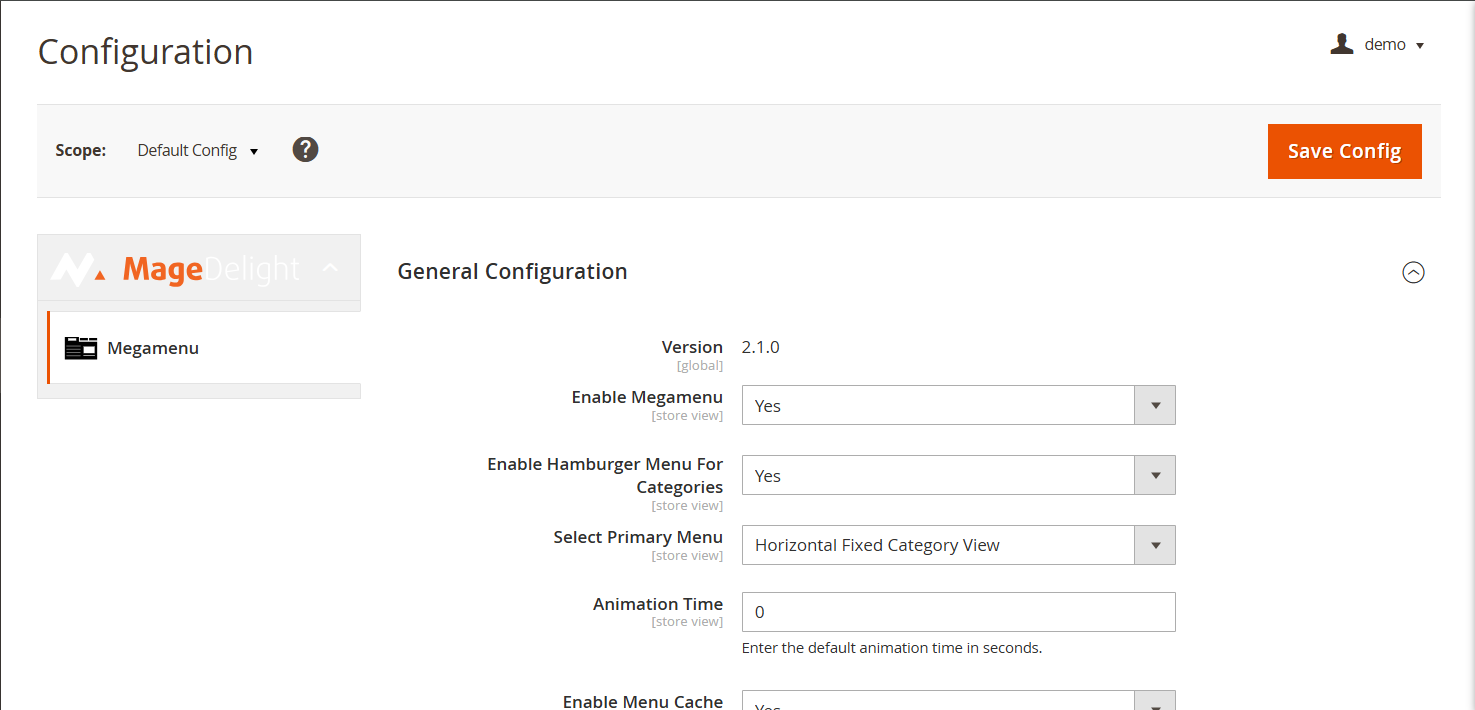
Admin experience determines whether a mega menu extension for Magento 2 remains usable as complexity increases. While all five extensions support menu creation, they differ in how that process is structured and who it is designed to serve over time.
- Amasty provides a configuration-heavy admin interface with extensive settings. This depth enables flexibility, but increases the learning curve for non-technical users managing frequent changes.
- WeltPixel prioritizes a visual, builder-style experience focused on speed and ease of setup. It supports quick assembly, though maintaining consistency across complex menus can require manual effort.
- BSS Commerce, through its BSS Mega Menu Magento 2 extension, follows a traditional configuration-driven model. It offers strong control, but day-to-day usability depends heavily on familiarity with the documentation.
- Magezon emphasizes drag-and-drop composition for rapid menu creation. Over time, structural management can become dependent on individual user habits.
- MageDelight balances structured configuration with admin clarity. Menu hierarchy, category logic, and content placement are clearly separated, making ongoing updates more straightforward to manage as menus scale.
The real usability question is not how quickly a menu can be created, but how confidently it can be maintained months later. This is where differences in admin design start to influence long-term ownership.
Layout Flexibility & Content Structure

As navigation grows more complex, layout decisions begin to affect maintainability as much as presentation, especially in a Magento 2 mega menu with images, where visual elements play a role in discovery. All five extensions support multi-level menus, but they differ in how content is structured, reused, and governed over time.
- Amasty supports multi-column layouts with nested categories and static blocks. Its structure is flexible, though managing consistency across large menus can require careful configuration.
- WeltPixel focuses on visually rich layouts with flexible columns and content blocks. This enables creative menus, but structural reuse across multiple menus can become design-dependent.
- BSS Commerce provides structured layouts with support for categories and CMS blocks. Its approach favors stability, though layout experimentation can feel more constrained.
- Magezon offers builder-driven layouts using rows, columns, widgets, and content elements. While highly flexible, long-term structure often depends on individual implementation choices.
- MageDelight emphasizes structured content placement. Categories, static blocks, and hierarchy are handled distinctly, making layouts easier to replicate and scale consistently.
Layout flexibility matters most when menus need to support both discovery and governance. The difference is not how much content can be added, but how reliably that structure holds as menus grow.
Visual Control and Brand Consistency
Brand consistency in navigation is rarely tested at launch. It is tested during the change. Theme updates, new devices, and evolving design standards quickly expose how tightly a mega menu is coupled to its styling approach.
- Amasty exposes a wide range of styling options within the extension itself. This reduces dependence on theme-level customization and allows controlled visual adjustments across menus.
- WeltPixel places strong emphasis on design freedom, often working closely with theme styling. This enables striking visuals, but increases coupling between the menu and the active theme.
- BSS Commerce relies more heavily on theme compatibility for visual consistency. Styling remains predictable, though deeper customization may require frontend effort.
- Magezon provides extensive visual controls through its builder interface. This allows detailed styling, but can introduce variability if multiple users manage menus differently.
- MageDelight aligns styling closely with theme standards. Limiting excessive per-element overrides helps preserve brand consistency across breakpoints and updates.
Branding consistency is tested most during change. When themes evolve, or devices shift, extensions that balance visual control with structural discipline tend to preserve intent more reliably.
Mobile & Responsive Menu Behavior
Mobile navigation exposes weaknesses that desktop menus often conceal, especially in a Magento 2 responsive mega menu where structure, touch behavior, and hierarchy must remain intact. A mega menu should not shrink responsively. The logic behind that menu must also remain intact when space, interaction patterns, and user intent change.
- Amasty Mega Menu Magento 2 extension offers responsive behavior with configurable mobile layouts. Desktop and mobile experiences remain aligned, though setup requires attention.
- WeltPixel adapts menus visually for mobile devices, focusing on collapsible structures and touch interactions. Visual consistency is strong, but structural parity can vary.
- BSS Commerce maintains consistent logic between desktop and mobile views. Its mobile handling is predictable, though customization options are more limited.
- Magezon automatically translates builder-based menus into mobile formats. This speeds up the setup, but complex layouts may require manual refinement.
- MageDelight focuses on structural parity between desktop and mobile. Menu logic remains consistent, with collapsible behavior designed for touch usability.
Mobile behavior becomes a deciding factor when navigation drives discovery. A menu that looks correct but behaves inconsistently can quietly erode usability where it matters most.
Performance, Compatibility & Technical Considerations
Mega menus are loaded across nearly every page, which makes their technical footprint difficult to ignore. Small inefficiencies that seem harmless in a demo can become real friction once traffic grows and the storefront carries more load. Performance is only one part of it. Compatibility, upgrade safety, and how reliably configurations hold after changes are what determine whether teams can maintain navigation without second-guessing every release.
- Amasty emphasizes compatibility with Magento versions and popular themes. Its approach prioritizes stability, though configuration complexity can add overhead.
- WeltPixel integrates closely with its ecosystem and themes. Performance remains acceptable, but coupling can increase dependency.
- BSS Commerce focuses on broad Magento compatibility and predictable behavior. Its conservative approach favors stability over experimentation.
- Magezon relies on frontend builders, which can introduce additional rendering layers. Performance depends on implementation discipline.
- MageDelight positions its extension for clean integration with Magento core and themes. Configuration persistence across upgrades is a key focus.
Technical considerations surface during upgrades, not initial setup. Extensions that minimize friction during those moments reduce long-term maintenance costs.
Feature Scope & Functional Differentiators
Feature lists often look similar at a glance, especially in mature extension categories. The more meaningful distinction lies in how far each product extends beyond core requirements and where it deliberately draws boundaries.
- Amasty includes a broad feature set covering layout, styling, and configuration. Its scope favors flexibility, with complexity as a trade-off.
- WeltPixel emphasizes visual enhancements and promotional elements. Advanced features are geared toward design-driven menus.
- BSS Commerce focuses on essential functionality with a controlled scope. Its feature set prioritizes reliability over expansion.
- Magezon extends functionality through builder components and widgets. This enables customization, though it can blur structural boundaries.
- MageDelight keeps feature scope tightly aligned with navigation use cases. Advanced capabilities support structure and control rather than visual experimentation.
Intentional limitation can be a strength. Feature scope matters less than how coherently those features support long-term navigation goals.
Pricing Models & Value Signals
If you want a quick read on how an extension fits into a business, focus on pricing before features. It usually signals what the vendor expects, who will buy it, how it will be used, and the level of complexity they assume you are dealing with. In mega menu extensions, which show up quickly through tiering, add-ons, and what is treated as standard versus paid.
- Amasty prices its Magento 2 Mega Menu at $229, aligning it with enterprise-focused extensions that prioritize depth, support, and long-term stability.
- WeltPixel lists its Mega Menu extension at $199. The pricing fits within its broader ecosystem approach, where design-driven functionality is often paired with theme usage.
- BSS Commerce follows a more accessible pricing model, with the Community and Enterprise editions commonly priced at $35 and $185, respectively. This signals a focus on cost-conscious merchants and smaller implementations.
- Magezon charges $169 for its Mega Menu, with optional add-ons for installation support (+$50) and priority support (+$99). The modular pricing reflects flexibility, with costs increasing based on service needs.
- MageDelight offers tiered pricing at $99 (Community), $199 (Enterprise), and $249 (Enterprise Cloud). The structure clearly supports merchants scaling across editions without forcing early upgrades.
What emerges is a difference in intent. Some pricing structures favor flexibility through add-ons, while others are designed to support merchants as they move across editions and operating complexity.
Support, Documentation, and Maintenance Signals
Support quality becomes visible only after the extension is live and in use. Documentation depth, update cadence, and responsiveness shape how confidently teams can rely on the product long term. Each vendor signals its maintenance philosophy differently.
- Amasty provides extensive documentation and structured support channels, with updates closely aligned with Magento releases.
- WeltPixel offers detailed guides tied to its ecosystem, benefiting users familiar with its themes.
- BSS Commerce maintains clear documentation and a focus on stable releases.
- Magezon supports its builder ecosystem with tutorials and resources, with maintenance tied to component usage.
- MageDelight emphasizes clear documentation and predictable updates, focusing on configuration clarity and upgrade safety.
Support matters most when navigation becomes business-critical. At that point, clarity and consistency often outweigh responsiveness alone.
What the Comparison Reveals
At this point, patterns should be clear. Each of these Magento 2 mega menu extensions is capable, but they are not interchangeable. The differences are less about features and more about fit.
Some extensions are strongest when speed and visual assembly matter most. Whereas builder-driven approaches work well for teams that prioritize rapid setup, flexible promotion, and hands-on design control. The trade-off is that structure and consistency often rely on individual discipline rather than enforced rules.
Others perform better in environments where navigation changes frequently and must remain predictable. Configuration-led models favor stability, governance, and repeatability, but may feel heavier during initial onboarding.
There are also differences in how extensions scale. Some optimize for early-stage convenience and modular add-ons. Others assume long-term use across editions, themes, and growing catalogs.
This is why declaring a single “best” option misses the point. The right choice depends on how mature the operation is today, who owns navigation internally, and how often the menu is expected to evolve. The feature volume alone does not answer those questions.
Mega Menu Extensions Comparison at a Glance
|
Criteria |
Amasty |
WeltPixel |
BSS Commerce |
Magezon |
MageDelight |
|
Drag and drop menu builder |
✔ |
✔ |
X |
✔ |
X |
|
Configuration-based menu setup |
✔ |
X |
✔ |
X |
✔ |
|
Multi-level/ nested menus |
✔ |
✔ |
✔ |
✔ |
✔ |
|
CMS blocks inside the mega menu |
✔ |
✔ |
✔ |
✔ |
✔ |
|
Widgets/ custom-content blocks supported |
✔ |
✔ |
X |
✔ |
X |
|
Separate mobile-menu handling |
X |
✔ |
✔ |
X |
✔ |
|
Responsive behavior |
✔ |
✔ |
✔ |
✔ |
✔ |
|
Theme compatability |
✔ |
✔ |
✔ |
X |
✔ |
|
Magento community and enterprise support |
✔ |
✔ |
✔ |
✔ |
✔ |
|
Pricing tiered by Magento edition |
X |
X |
✔ |
✔ |
✔ |
|
Optional paid installation or support |
X |
X |
X |
✔ |
X |
|
Documentation/ user guides |
✔ |
✔ |
✔ |
✔ |
✔ |
This table is not a scorecard. It is a lens. It helps surface where trade-offs exist so merchants can align choices with how they actually operate.
Conclusion
Mega menu decisions rarely feel consequential at the moment they are made. Early on, most extensions appear capable, differences feel marginal, and the focus naturally gravitates toward design and layout. The impact of those choices surfaces later, when catalogs expand, teams grow, and navigation is asked to support far more than simple discovery. What once felt like a UI decision begins to compound into an operational one.
This is where many merchants realize that choosing a mega menu based solely on visual flexibility or feature volume creates friction over time. Once a store grows, navigation has to stay predictable under pressure. It should be easy to update, hard to break, and stable even when priorities shift week to week. At that point, the real question is not what the menu can display. It is whether the menu can be governed and maintained consistently, without turning every update into a cleanup exercise.
In practice, mega menus are closer to infrastructure than to design once scale comes into play. Control, flexibility, and ownership become the defining criteria. The right extension is not universally “the best,” but the one that aligns with how a business operates today and how it expects to grow tomorrow.
For merchants who are already scaling, or actively preparing for it, MageDelight’s Magento 2 Mega Menu Extension fits naturally into this reality. Its emphasis on structured configuration, clear hierarchy, and edition-based scalability supports teams that need to evolve their navigation without constant intervention. It reflects an approach where menus are treated as long-term systems, built to support growth rather than react to it.
