


Most Magento SEO problems are visible. Thin product pages, missing meta descriptions, slow load times - these show up in audits and get fixed. Layered navigation SEO is different. The damage is structural, it compounds silently, and by the time a developer notices it, a store might have hundreds of thousands of near-duplicate URLs competing for the same crawl budget.
Here's the scale of the problem. Take a Magento store with 5,000 products and 20 filterable attributes. Each attribute has four selectable values. A shopper can combine any filters in any order - color, size, brand, style, material, price range. The theoretical number of URL combinations from layered navigation alone runs into the millions. Nearly all of them are near-identical to the base category page, contain no unique content, and are useless to search engines.
Googlebot doesn't know they're useless until it crawls them.
What Google Said in December 2024?
This matters more than most SEO articles give it credit for. In December 2024, as part of their "Crawling December" series, Google published dedicated official documentation on managing faceted navigation URLs - consolidating guidance that had previously existed only as a 2014 blog post.
Gary Illyes from Google Search Central stated plainly: faceted navigation is by far the most common source of overcrawl issues site owners report to Google, and in the vast majority of the cases the issue could've been avoided by following some best practices.
The official documentation at https://developers.google.com/crawling/docs/faceted-navigation (last updated December 2025) explains the mechanism directly. Because the URLs created for the faceted navigation seem to be novel and crawlers can't determine whether the URLs are going to be useful without crawling first, the crawlers will typically access a very large number of faceted navigation URLs before the crawlers' processes determine the URLs are in fact useless.
Two consequences follow from this: your server spends resources rendering pages nobody will see, and Googlebot has less budget remaining to crawl your actual product pages, new category additions, and updated content.
The documentation is also where most published guidance on this topic gets something importantly wrong - we'll cover that in a moment.
What Magento's Layered Navigation Actually Does to Your URLs
By default, Magento 2's layered navigation appends query string parameters to category URLs. A basic women's tops category looks like this:
/women/tops.html
Apply one filter:
/women/tops.html?color=49
Apply two:
/women/tops.html?color=49&size=168
Three:
/women/tops.html?color=49&size=168&style_general=140
Now change the color:
/women/tops.html?color=50&size=168
Each unique parameter combination is a new URL. With multi-select filters enabled - which is the default for most Magento stores - the combinations multiply combinatorially. A single category page with 15 attributes, each with 5 values, generates tens of thousands of possible filtered URLs.
Three specific problems compound:
Here are the 3 specific problems that occur.
1. Overcrawl
Google crawls these URLs because they look like real pages. Each one requires a server request, PHP execution, a database query, and a full page render. Varnish cache typically won't serve filter combinations because the query strings generate unique cache keys.
2. Slow Content Discovery
When crawl budget goes to thousands of filter URLs, it doesn't go to your new products, updated categories, or recently published content. A large catalog with aggressive layered navigation can make it take weeks for new product pages to be discovered.
3. Authority Dilution
The category page for "women's tops" - the one you actually want to rank for that query - is now competing with hundreds of near-identical filtered versions of itself. They have the same content, similar metadata, and point to the same products. None of them have external links or any reason for Google to prefer one over another.
The noindex vs. robots.txt Confusion Most Articles Get Wrong
This is worth being precise about, because the wrong answer is everywhere and costs stores real crawl budgets.
The widespread advice for handling filter pages is to add a noindex meta tag. That's wrong for crawl budget purposes, and Google's documentation says so.
From Google's crawl budget guide: don't use noindex as a method to save crawl budget. Google will still request and crawl a page when it encounters it, and only after crawling does it read the noindex directive and drop the page from the index. The page was still crawled. The server still had to respond. The budget was still consumed.
noindex controls what appears in search results. It does not control crawling.
robots.txt disallow controls crawling. When Googlebot sees a disallow rule, it doesn't request the page at all. No server load, no crawl budget consumed.
The correct tool for each job:
- To save crawl budget: robots.txt disallow
- To prevent a page from appearing in search results (while still allowing crawling): noindex
- For most filter pages: robots.txt is what you actually want
There is one practical caveat: don't combine them. If you disallow a URL in robots.txt, Googlebot can't crawl the page to read any noindex tag. Using both is redundant and can cause confusion. Pick one based on what you're trying to achieve.
Three Strategies for Layered Navigation SEO - And When to Use Each
There's no single right answer for layered navigation SEO. The correct strategy depends on your catalog size, your filter structure, and whether any specific filter combinations have genuine search volume. Here's a decision framework.
Strategy 1: Block Everything
Use when: You have a large number of filterable attributes, most filter combinations don't correspond to real search queries, and you want maximum crawl budget efficiency.
How it works: Use robots.txt to block all parameterized category URLs. Add canonical tags on all filter pages pointing to the parent category as a secondary signal.
A targeted robots.txt approach:
User-agent: Googlebot
Disallow: /*?*color=
Disallow: /*?*size=
Disallow: /*?*style_general=
Or, more aggressively, block all query strings from category paths:
Disallow: /women/tops.html?
Disallow: /men/shirts.html?
Google's own documentation gives a similar example: Use robots.txt to disallow crawling of faceted navigation URLs. Oftentimes there's no good reason to allow crawling of filtered items, as it consumes server resources for no or negligible benefit; instead, allow crawling of just the individual items' pages along with a dedicated listing page that shows all products without filters applied.
What you lose: Long-tail traffic from specific filter combinations. For most stores this is minimal - filtered pages with no unique content, no backlinks, and no editorial differentiation rarely rank well enough to generate meaningful traffic regardless.
Magento admin step (native, no extension required):
Stores → Configuration → Catalog → Catalog → Search Engine Optimization → Use Canonical Link Meta Tag for Categories → Yes
This adds canonical tags to filtered pages pointing back to the main category. It's a secondary safeguard - it doesn't block crawling, but it consolidates any link signals that might reach filter URLs back to the canonical category page.
Strategy 2: Index Single-Filter Pages, Block Multi-Filter Combinations
Use when: Some single-attribute filter pages have genuine search volume - "red dresses," "size 10 running shoes," "Nike trainers" - and you want to capture that traffic while stopping the combinatorial URL explosion from multi-filter combinations.
How it works: Allow single-filter pages to be crawled and indexed. Apply noindex, follow to pages where two or more filters are active. This eliminates the exponential URL growth while preserving the SEO value of high-intent single-filter pages.
This level of control requires an SEO extension - native Magento doesn't have per-attribute robots settings or filter count thresholds. Extensions that handle this:
- MageWorx SEO Suite Ultimate has a specific setting for this: "Count of filters for set NOINDEX, FOLLOW for LN" - you set a threshold and any page exceeding that filter count gets noindexed automatically.
- Amasty Improved Layered Navigation includes a "Noindex when Multiple Attribute Filters Applied" setting.
- MageDelight Advanced SEO Suite handles canonical URL configuration for layered navigation pages, letting you set the canonical target per attribute.
Strategy 3: Index Selected Filter Pages as SEO Landing Pages
Use when: Specific filter combinations have real commercial search volume, you can create unique content for them, and you have the editorial resources to maintain them.
Examples: A clothing retailer might deliberately target "red linen shirts," "men's slim-fit chinos," or "waterproof hiking boots under $150" - queries where the filter combination maps to something people actually search for as a product category.
Critical requirement from Google's documentation: If you need your faceted navigation URLs to be potentially crawled and indexed, ensure you're following these best practices to minimize the negative effects of crawling the large number of potential URLs on your site. That includes: using the standard & separator between parameters, maintaining consistent filter order if encoding in the URL path, and returning HTTP 404 when a filter combination returns no results.
Beyond technical requirements: any filter page you deliberately index needs a unique meta title, unique meta description, and ideally a short introductory paragraph. A filtered page with auto-generated metadata that duplicates the parent category's metadata will not rank for anything - it has nothing that differentiates it. Strategy 3 only works if you treat these pages as real content pages, not just URL artifacts.
Native Magento 2 Admin Settings - What You Can Configure Without an Extension
Four settings in the Magento admin directly affect layered navigation SEO. These apply to all Magento 2.4.x stores without any extension required.
1. Enable canonical tags for categories Path:
Stores → Configuration → Catalog → Catalog → Search Engine Optimization Setting: Use Canonical Link Meta Tag for Categories → Yes
This is the baseline that every store should have enabled. It tells Google which version of a category page is the "real" one, consolidating link equity back to the unfiltered URL.
2. Enable canonical tags for products Same path:
Use Canonical Link Meta Tag for Products → Yes
Products accessible through multiple category paths (/men/shirts/blue-shirt.html and /clearance/blue-shirt.html) need a single canonical URL. Without this, products assigned to multiple categories generate duplicate product pages - a separate but related problem.
3. Remove category path from product URLs Path:
Stores → Configuration → Catalog → Catalog → Search Engine Optimization Setting: Use Categories Path for Product URLs → No
When enabled, this setting creates category-specific product URLs that change depending on which category path a product is accessed through. Products in multiple categories get multiple URLs, all pointing to the same product. Turning this off and relying on canonical tags is cleaner.
4. Edit robots.txt via admin Path:
Content → Design → Configuration → [Store view] → Edit → HTML Head → Robots
Magento allows robots.txt editing from the admin panel. This is where you add disallow rules for layered navigation parameters. Be specific: list the actual parameter names your layered navigation generates (color, size, brand, style_general, etc.) rather than using a blanket Disallow: /*? rule, which may accidentally block legitimate parameterized URLs you do want crawled.
The hard limits of native configuration: Magento's built-in canonical settings are binary - all category pages get the same canonical behavior. You cannot set noindex only when two or more filters are active. You cannot allow specific attributes to be indexed while blocking others. You cannot generate SEO-friendly URL paths for individual attributes. Those capabilities require an SEO extension.
What SEO Extensions Add?
Per-attribute robots control. Most SEO extensions let you configure robots tag behavior per filterable attribute - from Stores → Attributes → Product → [attribute] → Frontend Properties. This lets you index "brand" and "color" filter pages (which may have real search volume) while blocking "material" or "style_general" (which typically don't).
Threshold-based noindex. Setting a filter count threshold - "apply noindex to all pages where 2 or more filters are active" - handles the combinatorial URL explosion at its source.
SEO-friendly URL rewriting. Instead of /tops.html?color=49&size=168, extensions like Mirasvit generate /tops/red/small.html - human-readable, keyword-containing paths that are cleaner if you choose to index them. Important caveat: SEO-friendly URLs don't solve the indexation problem by themselves. A clean URL pointing to a near-duplicate page with no unique content still won't rank. Combine URL rewriting with proper noindex/canonical configuration, not instead of it.
One principle that applies regardless of which extension you use: the extension implements your strategy. It doesn't replace having one. An extension that generates clean filter URLs while leaving all of them indexable makes the crawl budget problem worse, not better.
How to Check What's Actually Happening Now?
Before changing configuration, it's worth auditing your current state. Four checks take less than 20 minutes.
1. Google Search Console → Index → Pages Look for the "Crawled - currently not indexed" status. If you have thousands of URLs in this category, it typically means Google is finding and crawling your filter pages but not considering them worth indexing. This is the most common signal of filter URL overcrawl.
2. Server log analysis If you have access to server logs or Screaming Frog's Log File Analyzer, identify what percentage of Googlebot requests go to layered navigation URLs versus category and product pages. If more than 30% of crawl requests are going to filter combinations, this is a meaningful budget problem.
3. site: search volume A rough proxy: run site:yourstore.com in Google and look at the estimated page count. If it's dramatically higher than your actual product and category count, filter pages are likely indexed.
4. URL Inspection tool on specific filter URLs Use Google Search Console's URL Inspection tool on a few representative filter URLs. Check whether they're in the index, what canonical Google has selected, and whether your robots or noindex configuration is being read correctly. This is also how you verify after making configuration changes.
Common Mistakes to Avoid
Using noindex to save crawl budget. As covered - noindex prevents indexation, not crawling. If crawl budget is the problem, robots.txt is the correct tool.
Adding filtered pages to your XML sitemap. Your sitemap should contain canonical URLs only - your real category pages, not their filtered variants. Including filter URLs in the sitemap signals to Google that these pages are important and worth indexing, working directly against your canonical and noindex configuration.
Using SEO-friendly filter URLs without a noindex strategy. Clean URLs are better UX. They don't inherently solve anything on the SEO side. Decide whether to index a filter page based on whether it has unique content and genuine search intent - not based on whether the URL looks clean.
Applying the same robots treatment to all attributes. "Brand" filter pages for a recognizable brand name can rank. "Sort by newest" pages have zero search intent. Treating all filterable attributes identically - either all blocked or all indexed - misses the opportunity to capture real long-tail traffic while still blocking the combinatorial waste.
Blocking too aggressively. robots.txt rules that block all query strings can accidentally catch URLs that aren't from layered navigation. After making any robots.txt changes, verify with Google Search Console's URL Inspection tool that legitimate category and product pages are still crawlable.
Quick Implementation Checklist
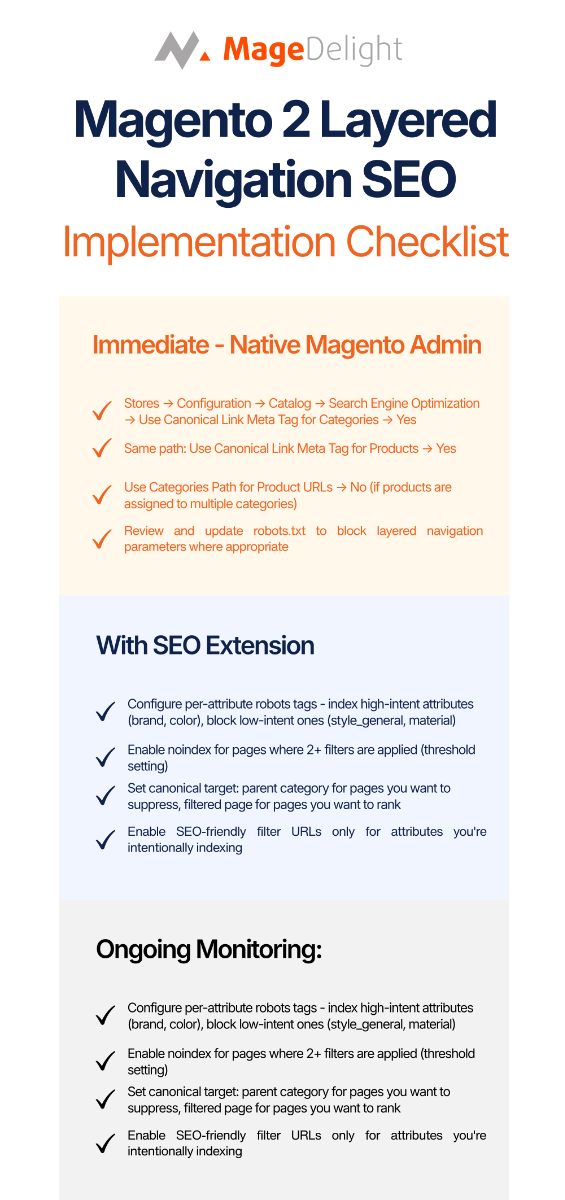
Immediate - native Magento admin, no extension required:
- Stores → Configuration → Catalog → Search Engine Optimization → Use Canonical Link Meta Tag for Categories → Yes
- Same path: Use Canonical Link Meta Tag for Products → Yes
- Use Categories Path for Product URLs → No (if products are assigned to multiple categories)
- Review and update robots.txt to block layered navigation parameters where appropriate
- Ensure filtered pages are not included in your XML sitemap
With SEO extension:
- Configure per-attribute robots tags - index high-intent attributes (brand, color), block low-intent ones (style_general, material)
- Enable noindex for pages where 2+ filters are applied (threshold setting)
- Set canonical target: parent category for pages you want to suppress, filtered page for pages you want to rank
- Enable SEO-friendly filter URLs only for attributes you're intentionally indexing
Ongoing monitoring:
- Check Google Search Console → Pages → "Crawled but not indexed" monthly - growth here indicates filter URL overcrawl
- Use URL Inspection to verify canonical and robots configuration is being read correctly after any changes
- Review crawl budget efficiency in server logs quarterly
FAQ
Here are the common questions and their answers you might have.
1. Does Layered Navigation Hurt Seo In Magento 2?
Not inherently - layered navigation is a user experience feature that works well. The SEO problem is the default URL parameter implementation, which generates near-infinite duplicate URLs unless properly configured. Configured correctly (with appropriate robots.txt rules or noindex/canonical settings), it has minimal SEO impact.
2. Should I Use Noindex Or Robots.Txt To Block Filter Pages?
Depends on what you're trying to achieve. To save crawl budget, use robots.txt - Googlebot won't request blocked URLs at all. To prevent pages from appearing in search results while still allowing crawling, use noindex. For most filter pages where the goal is crawl budget efficiency, robots.txt is the right tool.
3. What's The Difference Between Canonical Tags And Noindex For Filter Pages?
Canonical tags tell Google which version of a page is the "real" one - they consolidate link signals but don't prevent crawling. Noindex tells Google not to include a page in search results, but Google still crawls it. Neither saves crawl budget. For crawl budget, use robots.txt disallow.
4. Can I Index Some Filter Pages And Block Others In Magento?
Yes, but it requires an SEO extension. Native Magento applies canonical settings globally across all filtered pages. Extensions like MageWorx SEO Suite Ultimate and Amasty allow per-attribute robots configuration and threshold-based noindex rules that give you this granularity.
5. Do SEO-Friendly Filter Urls Help Rankings?
They improve readability and can include keywords in the URL path, which is a minor ranking factor. But clean URLs don't compensate for a lack of unique content. A filter page at /tops/red/small.html with no unique editorial content will still not rank meaningfully. URL rewriting is worth doing for indexed filter pages - it's not a substitute for a content strategy.
6. How Do I Know If Layered Navigation Is Wasting My Crawl Budget?
Check Google Search Console for a high volume of "Crawled - currently not indexed" pages. If a significant share of URLs in this status are filter combinations (identifiable by query string parameters), that's Google telling you it found and crawled these pages but didn't find them worth indexing. Crawl budget was spent; no value was returned.
7. Does Magedelight Advanced SEO Suite Handle Layered Navigation SEO?
Yes - MageDelight handles canonical URL configuration for layered navigation pages, including setting the canonical target globally and overriding per attribute. This covers the Strategy 1 and Strategy 2 approaches without requiring separate configuration.
Conclusion
The most common mistake with Magento layered navigation SEO is treating it as a one-time technical checkbox. It's a structural decision about which pages on your store Google should spend time crawling and indexing - and the answer changes as your catalog grows and your filter attributes multiply.
For most stores, the clearest path forward is Strategy 1: block filter URLs with robots.txt, enable canonical tags on category pages, and exclude filter URLs from your XML sitemap. This is the configuration Google's own documentation points toward for stores that don't have specific filter combinations worth indexing.
Where specific filters have real commercial search volume - brand pages on a footwear retailer, color pages on a fashion store - the work of properly indexing those pages (unique content, distinct metadata, SEO-friendly URLs) is worth doing. But that's deliberate content work, not a default configuration choice.
Get the basics right first. The leverage from fixing crawl budget waste is higher than most stores realize.
You can also checkout our Magento 2 Improved Layered Navigation & Advanced Multi-select Product Filters with AJAX Extension.
