


Fashion ecommerce clothing return rates average 26% in the US - roughly one in four items purchased online comes back, according to the National Retail Federation's 2025 report. The single biggest driver is not price or quality: it is the gap between what shoppers see in a product image and what arrives at their door. That gap exists because too many fashion stores still rely on flat lay photos that cannot show drape, fit, or proportion on a real body.
Zalando, Europe's largest online fashion retailer, published the clearest case study for what AI changes here. By Q4 2024, 70% of their editorial campaign images were AI-generated, compressing production cycles from six to eight weeks down to three to four days and cutting costs by up to 90%. That is not a marginal improvement. It is a complete rethinking of how fashion imagery gets made - and it is now accessible to Magento 2 stores of any size.
This guide covers the actual mechanics: what AI fashion catalog image generation does, why it moves conversion and return metrics specifically for clothing, how to implement it inside Magento 2 without disrupting your existing product catalog workflow, and where extensions like MageDelight's AI Fashion Catalog Image Generator close the gap between AI image tools and your Magento 2 admin.
The Real Cost of Bad Fashion Photography
For most Magento 2 fashion stores, the catalog image problem has three parts: cost, coverage, and consistency.
Cost: Traditional Shoots Add Up Fast
A mid-range fashion photoshoot runs $2,000–$8,000 per session, with per-image costs landing at $50–$500 once you factor in model fees ($500–$2,000/day), photographer ($500–$3,000/day), studio ($200–$1,000/day), hair and makeup, and post-production retouching. A 50-product shoot runs roughly $91 per product at the mid-range. A brand shooting 200 products across four to six sessions annually faces $25,000–$60,000 in photography costs - before any reshoots. The 15–20% reshoot rate adds another $500–$2,000 per session whenever garments, lighting, or styling miss the mark.
That cost structure means most fashion stores make a compromise that directly hurts sales: they photograph hero products and best-sellers in full on-model treatment, then publish flat lays or packshots for secondary colorways and new arrivals. Those secondary products get listed with inferior imagery, predictably converting at a lower rate.
Coverage: The Colorway Problem
According to Baymard Institute's UX research, 56% of users explore product images as their first action on a product detail page - before reading the description, price, or reviews. Yet 28% of the largest 60 ecommerce sites fail to provide any 'in-scale' images for even their best-sellers, according to Baymard's benchmark data. For a fashion store with 200+ SKUs across multiple colorways, providing on-model images for every variant is financially out of reach using traditional shoots.
The conversion cost is real. Pixelphant's research across prime fashion ecommerce brands found that 95.6% use model photography as their primary product image style, precisely because it outperforms alternatives. On-model imagery converts 20–30% higher than flat lay for most clothing categories, drives 25–35% better click-through rates from search thumbnails, and reduces return rates by 15–25% when used as the primary product image. The stores that cannot afford full on-model coverage for every SKU are leaving measurable revenue on the table.
Consistency: The Patchwork Catalog Problem
When some products have studio-lit, professionally styled on-model images and others have smartphone flat lays, the catalog looks inconsistent. That inconsistency signals to shoppers - consciously or not - that a store is not fully professional. It also makes it impossible to run cohesive seasonal campaigns, since the imagery is too varied in quality and style to present as a unified collection.
In a 2025 Stylitics and Aha Studio survey, 76% of shoppers said on-model photos are the most useful format for purchase decisions. The brands that cannot provide them consistently for every SKU are trading on a structural disadvantage.
What AI Fashion Catalog Image Generation Actually Does?
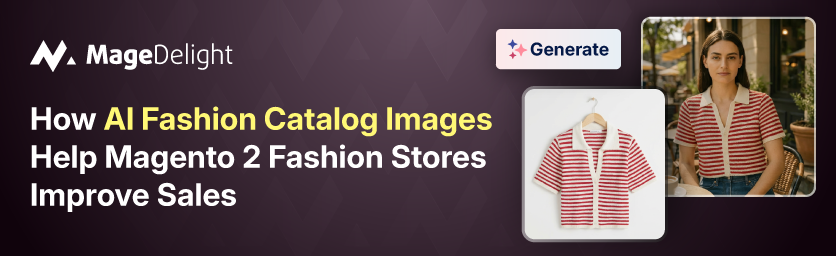
AI fashion image generation converts a product packshot or flat lay into a photorealistic on-model image - without booking a model, renting a studio, or waiting weeks for post-production.
The core workflow is upload a garment image → select an AI model → the system simulates how that fabric drapes on that body → output a retail-ready image. Modern platforms produce results at up to 4K resolution, formatted for product detail pages, social media, and paid advertising.
What separates production-grade AI fashion imagery from basic tools is fabric simulation. Sophisticated systems do not paste garments onto model images - they model how specific fabric weight, texture, and cut behave on a human body, including creasing, drape, and fit. The technology has shifted from physics-based simulation to generative neural networks trained on fashion photography, which is how it produces results that 71% of shoppers cannot distinguish from traditional photography when quality is high.
What the AI Actually Generates?
Here what AI Fashion Catalog Image Generation actually generates.
- On-model PDPs: the primary listing image showing the garment worn on a human body, replacing flat lays or packshots
- Colorway variants: a new on-model image for each colorway without a separate shoot - one base photo generates a full color range
- Diverse model representation: select from libraries covering different body types, ethnicities, age ranges, and demographics
- Lifestyle and campaign images: the same AI model, different backgrounds and settings - studio white, outdoor lifestyle, editorial
- Multi-angle views: front, back, detail shots - all generated from a single garment reference
What It Does Not Replace (Yet)?
AI fashion image generation is not a full substitute for hero campaign photography where premium editorial quality matters most, or for garments with highly complex construction where fabric behavior is difficult to simulate accurately. The honest position: use AI for complete catalog coverage on PDPs and colorways; use traditional shoots for flagship campaigns where brand story is the primary output.
The Sales Impact: What the Data Shows?
AI On-Model vs Flat Lay: Key Performance Metrics
|
Metric |
Flat Lay / Packshot |
AI On-Model |
Source |
|
Conversion rate |
Baseline |
+20–30% higher |
Metamodels.ai / Pixelphant |
|
Add-to-cart rate (multi-angle) |
Baseline |
+73% (ASOS data) |
SellHound / ASOS |
|
Click-through from search |
Baseline |
+25–35% |
Metamodels.ai |
|
Return rate |
Fashion avg: 26% (NRF 2024) |
–15 to –25% reduction |
NRF / Metamodels.ai |
|
Time on product page |
Baseline |
+40–60% |
Metamodels.ai |
|
Shopper preference (survey) |
24% preferred |
76% preferred (Stylitics/Aha Studio 2025) |
Stylitics |
Note: percentage lifts are category averages from multiple studies; individual store results vary by garment type, existing image quality, and implementation.
Why Return Rates Drop Specifically?
Online fashion returns are driven overwhelmingly by fit and expectation mismatch. According to National Retail Federation data, online clothing return rates average 26% - more than four times the in-store rate of 6.2%. The difference: in-store shoppers try items before purchasing; online shoppers guess from photos.
On-model images close that gap by showing drape, proportion, and fit on a human body. They answer the question a flat lay cannot: "Will this look right on me?" When shoppers can make that judgment from the product page - rather than discovering the answer after the item arrives - fewer packages come back. The math matters: each return costs a fashion retailer between $20 and $65 beyond the refund itself in reverse logistics, restocking, and lost resale value.
The Zalando Case in Numbers
Zalando's experience provides the most well-documented production-scale data. Per their official strategy announcement, AI image generation cut production time from 6–8 weeks to 3–4 days per campaign cycle, reduced costs by up to 90%, and allowed them to respond to social trends - like the "brat summer" aesthetic - within 24 hours of the trend peaking. By Q4 2024, 70% of their editorial campaign images were AI-generated.
The conversion implication: trend-aligned fashion content converts 3.2× better than generic product photography, according to Retail Systems 2024 data. The brands that can produce catalog images quickly enough to be trend-relevant capture that conversion premium. The brands still waiting weeks for traditional shoots miss the window entirely.
Why Magento 2 Fashion Stores Face a Specific Problem?
Generic AI fashion image tools solve the image generation problem. They do not solve the Magento 2 workflow problem.
A Magento 2 fashion store typically manages hundreds to thousands of SKUs across product attributes - colors, sizes, styles - with images organized and mapped at the product and configurable product level. The standard workflow for updating product images requires: downloading the source image, processing it through an external AI tool, downloading the output, then uploading it manually to the correct product in Magento admin and assigning it to the correct gallery position. Multiply that by hundreds of colorway variants and the time savings from AI image generation get partially eaten by manual Magento data entry.
The more significant problem is catalog completeness. Magento 2 stores that have launched hundreds of products frequently have image gaps - SKUs with flat lays but no on-model images, colorways with no images at all, new arrivals published with placeholder photos. These gaps are invisible in the admin panel unless someone audits them manually. The result is a live store with uneven product image quality, where some PDPs convert well and others leak revenue silently.
Implementing AI Fashion Images in Magento 2
The implementation question for a Magento 2 store has two parts: how to generate the images, and how to get them into your product catalog efficiently.
Option 1: Standalone AI tools + manual upload
Standalone platforms like Nightjar, Fashn, Uwear, or MetaModels.ai generate high-quality on-model images from packshots. These tools are strong on image quality - Fashn is particularly noted for garment drape accuracy; Nightjar for catalog-scale consistency through reusable visual styles. The limitation is workflow integration: images are generated externally, then imported to Magento manually.
For a store updating 20–30 products per month, this is manageable. For a store managing seasonal drops of 200+ SKUs, the manual import creates a bottleneck that negates much of the speed advantage AI image generation provides.
Option 2: Native Magento 2 Integration
The cleaner approach for Magento 2 stores is a native extension that runs AI image generation directly within the Magento admin. MageDelight's AI Fashion Catalog Image Generator ($299) takes this approach: store owners generate on-model fashion images directly from product pages in Magento 2 admin, and generated images are assigned to product galleries without leaving the platform.
This matters practically for a few reasons. First, it eliminates the download-upload cycle for every image. Second, it makes catalog image updates scalable - a merchandising manager can work through a product queue without switching between platforms. Third, it keeps image management inside the Magento workflow where product data, image metadata, and alt text all live together.
What to Audit Before Implementing?
Here is what you need to audit before installing the extension.
- List every active SKU that currently lacks an on-model image - this is your conversion gap in product form
- Identify which product types benefit most from on-model treatment: dresses, knitwear, outerwear, and tailored pieces see the highest conversion lift; flat-structured items like socks or plain tees see less impact
- Map your colorway structure - each colorway that lacks on-model imagery is a separate revenue leak
- Decide on model selection criteria: which body types, ethnicities, and demographics match your target customer
- Establish image consistency standards before generating: same framing, same lighting mood, same crop height, so the generated images form a cohesive catalog rather than a patchwork
MageDelight's AI Fashion Catalog Image Generator: What It Does
For Magento 2 fashion stores specifically, MageDelight's AI Fashion Catalog Image Generator addresses the integration gap that standalone tools leave open. The extension lets store owners and merchandising teams generate AI fashion model images directly inside the Magento 2 admin - taking a product's existing packshot or flat lay and producing on-model catalog images that are automatically added to the product gallery.
The workflow is: open a product in Magento admin → upload or select the garment image → choose model attributes (body type, ethnicity, pose style) → generate → images are returned to the product gallery ready for publishing. No external tool login required. No file management between systems.
At $299, the extension is priced at roughly the cost of one product's worth of traditional photography - a single add-to-cart session with a model, photographer, and studio. Applied across a catalog of 100+ products, the per-image economics shift dramatically.
MageDelight is an official Hyvä Theme Partner and Adobe Bronze Solution Partner. Their extension catalog includes 45+ Hyvä-compatible extensions, meaning the AI Fashion Catalog Image Generator fits within a broader Magento 2 and Hyvä ecosystem rather than operating as an isolated tool.
Standalone AI Tools vs Native Magento 2 Extension
|
Dimension |
Standalone AI Tools |
MageDelight Extension (Native) |
|
Image generation quality |
High - purpose-built tools |
High - AI backend specialized for fashion |
|
Workflow integration |
External - manual download/upload |
Native - generates inside Magento admin |
|
Catalog management |
None - images managed externally |
Auto-assigns images to product gallery |
|
Suitable for batch operations |
Varies - some have batch tools |
Yes - works within existing Magento product queue |
|
Hyvä compatibility |
N/A (platform agnostic) |
Yes - Hyvä-compatible extension |
|
Starting cost |
$12–$33/month (subscription) |
$299 one-time |
Building a Catalog Image Strategy for a Fashion Store
The common mistake is treating AI image generation as a one-time fix rather than a workflow. The stores that see the biggest gains use it systematically.
Phase 1: Fill the Coverage Gaps
Start with the products already live on your store that lack on-model images. These are existing conversion leaks - traffic is already landing on these pages, and some portion is not converting specifically because the imagery does not show the garment on a body. Run your product catalog audit, identify every SKU in this state, prioritize by traffic volume and margin, and work through them in order.
Phase 2: Full Colorway Coverage
For any configurable product (a dress available in 8 colors, a top available in 12), ensure every colorway has its own on-model image rather than defaulting to the single hero color. Shoppers browsing a blue variant who only see the black on-model image have to mentally substitute - and some percentage will not bother. Each colorway with its own on-model image closes that gap. AI generation makes this practical: one base garment, multiple AI-generated colorways, the same model and pose for visual consistency.
Phase 3: New Arrivals Pipeline
Establish a standard process for every new product addition: no product goes live without an on-model image. This requires the product creation workflow in Magento 2 to include image generation as a step, not an afterthought. With a native extension like MageDelight's AI Fashion Catalog Image Generator, this step happens inside the product admin page and adds minutes rather than weeks to the publish cycle.
Phase 4: Diverse Model Representation
Use the model selection layer deliberately. Run A/B tests on product pages using different AI models - different body types, ethnicities, ages. The data from inclusive representation studies is consistent: customers who see themselves represented in product imagery convert at higher rates and return products less often. Research from The Drum found that ads featuring inclusive portrayals see up to 5% uplift in short-term effectiveness and 16% growth in long-term sales. AI model libraries make this economically viable for every SKU, not just hero campaigns.
SEO and Magento Product Page Benefits
AI fashion images are not only a conversion tool - they have secondary effects on how Magento 2 product pages perform in search.
Google's image search drives meaningful discovery traffic for fashion stores. On-model images, properly alt-tagged with descriptive text that includes product name, color, and fit context, perform better in image search than flat lays. The reason is practical: when someone searches "blue midi dress on model" they want to see images that match that intent, and flat lays do not.
Page engagement metrics - time on page, scroll depth, bounce rate - are also affected by image quality and variety. Baymard Institute's large-scale usability testing found that 56% of users begin with product images on a PDP, and low-quality photography or insufficient image variety led to high cart abandonment rates. The pages with multiple high-quality on-model images across different poses and settings retain shoppers longer, which sends positive engagement signals regardless of direct ranking factor status.
Magento 2's product gallery supports multiple images per product and configurable-product image switching by attribute. Using MageDelight's AI Fashion Catalog Image Generator to populate that gallery fully - primary on-model, secondary lifestyle or detail shots - takes advantage of Magento's native image management without requiring custom development.
Common Mistakes to Avoid
Below common mistakes you need to avoid while using the AI Catalog Image Generator.
Generating Images Without Consistency Standards
If each product page uses a different AI model, different crop height, and different lighting mood, the catalog becomes a patchwork that looks more like a Pinterest board than a professional store. Set your image style parameters before generating at scale: decide on the pose type, framing, background, and model selection criteria, then apply them consistently. Visual cohesion across a collection page is what makes a brand look like a brand rather than an aggregator.
Treating AI Images as Good Enough Without QA
AI image generation produces results that are consistently convincing at first glance. The issues appear on closer inspection: incorrect button colors, missing stitching detail, fabric texture that does not match the actual garment, colors that shift between the packshot and the generated image. A QA pass on every generated image before publishing - checking garment accuracy against the source image - is not optional. Inaccurate product images that set wrong expectations cause returns, which are more expensive than the time the QA step takes.
Ignoring Mobile Display
Fashion ecommerce traffic is majority mobile for most stores. AI-generated images at 4K resolution look excellent on desktop. On mobile, the display depends on thumbnail sizing, lazy loading, and image compression. Test every generated image at mobile viewport sizes before finalizing your image pipeline. A technically perfect 4K image that is slow to load on mobile is worse for conversion than a smaller well-optimized image.
Not Measuring the Before/after
Set up conversion tracking by product before rolling out AI images at scale. Specifically: track add-to-cart rate by product and compare pages that previously had flat lay images to the same pages after AI on-model images are added. This data tells you where AI image upgrades drove the most conversion lift, which helps prioritize the next batch and build the internal business case for continued investment.
Decision Framework: Is This Right for Your Store?
AI fashion catalog image generation is a good fit for your Magento 2 store if:
- You sell apparel where fit, drape, and proportion matter for the purchase decision - dresses, knitwear, outerwear, trousers, tailored pieces
- You have SKUs or colorways currently published with flat lays or no images, where you know conversion is underperforming
- You have new collections that need catalog images faster than a traditional shoot can deliver
- Your fashion photography budget is a constraint on how comprehensively you can cover your catalog
- You want to offer diverse model representation across your catalog without booking multiple models per product
It is less immediately valuable if:
Your products are primarily accessories, jewelry, or structured items where fit is not the primary decision driver
You have a small SKU count (under 20 products) where traditional photography remains manageable
Your current catalog already has full on-model coverage with consistent, high-quality imagery
For most Magento 2 fashion stores with growth ambitions, the economics are straightforward: at $299 for a native Magento 2 extension, MageDelight's AI Fashion Catalog Image Generator pays for itself the first time it allows you to publish a new colorway - or recover a sale that would otherwise have been lost to an uninformative flat lay.
Final Thoughts
The AI in fashion market reached $2.92 billion in 2025 and is growing at 40.8% annually, per Research Nester. Much of that growth is happening precisely because the technology has matured to where AI-generated fashion imagery is photorealistic, affordable, and - crucially - faster than the trend cycles it needs to keep up with.
For a Magento 2 fashion store, the opportunity is specific and measurable: every product page currently showing a flat lay instead of an on-model image is converting at a rate 20–30% below what it could. Every colorway without its own on-model image is a version of the same leak. The shoppers are already there - the imagery is what is not closing the sale.
The Zalando result - 90% cost reduction, 6-8 weeks to 3-4 days - is an enterprise-scale outcome. The same principle scales down. A Magento 2 store with 300 SKUs and a patchwork of flat lays and on-model images can close that gap systematically, one product queue at a time, without a studio or model booking in sight.
Explore MageDelight's AI Fashion Catalog Image Generator for the Magento 2 native implementation, or browse their full AI-powered extension catalog for additional tools that extend Magento 2's commerce capabilities. For stores also considering a frontend performance upgrade, MageDelight's Hyvä Theme Development Services ensure the faster, more compelling product images you generate load on a storefront fast enough to convert.
