


With Facebook and Instagram driving massive eCommerce engagement, establishing a strong social presence is no longer optional. By creating a Facebook product feed for Magento 2, you can automatically sync your store catalog with Facebook’s Catalog Manager and run dynamic product ads that convert.
In this article, we’ll walk you through the complete process — from generating your product feed and setting up configurations to choosing the right extensions and optimizing for better performance.
Key Takeaways:
- A Magento 2 Facebook product feed bridges your store with Facebook and Instagram for dynamic advertising.
- Use a Magento 2 Facebook product feed extension to simplify generation and automate syncing.
- Include all required product fields and optimize your feed for accuracy and engagement.
- Regularly update and monitor your feeds to ensure your ads show the latest data.
- An optimized Facebook feed boosts visibility, engagement, and sales across social platforms.
What Is a Facebook Product Feed?
A Facebook Product Feed is a structured data file—typically in CSV, XML, or JSON format—that contains detailed information about your products.
This feed enables Facebook to pull your product details such as:
- Product titles
- Descriptions
- Prices
- Availability
- Images
- URLs
Once uploaded, Facebook uses this feed to create Dynamic Ads, Facebook Shops, and Instagram Shopping experiences.
When integrated with Magento 2, the Facebook product feed ensures your product data stays synchronized automatically — meaning customers always see the latest prices, stock status, and offers.
Why Do You Need a Facebook Product Feed in Magento 2?
Generating a Facebook feed in Magento 2 allows you to:
- Showcase your store’s products across Facebook and Instagram.
- Run Dynamic Ads to retarget shoppers with relevant products.
- Keep your catalog automatically synced with real-time updates.
- Boost conversions through personalized, audience-driven ads.
- Save time and reduce manual effort by automating catalog management.
Simply put, a Facebook product feed bridges your Magento store with Facebook’s marketing ecosystem, enabling seamless multichannel selling.
Required Fields in a Facebook Product Feed
To comply with Facebook Catalog requirements, each product in your Magento 2 Facebook product feed must include the following mandatory fields:
| Field | Description |
| id | Unique product identifier |
| title | Product name |
| description | Brief description of the product |
| availability | Availability status (in stock / out of stock) |
| condition | Product condition (new, refurbished, used) |
| price | Price with currency |
| link | Product page URL |
| image_link | Product image URL |
| brand | Brand name |
Optional but highly recommended fields include:
- google_product_category
- sale_price and sale_price_effective_date
- color, size, gender, age_group
- item_group_id (for product variants)
- shipping and shipping_weight
These fields help Facebook display your products accurately and improve ad targeting performance.
How to Create a Facebook Product Feed in Magento 2
Magento 2 doesn’t generate Facebook feeds by default, so you’ll need to use a Magento 2 Facebook Product Feed Extension. These extensions automate feed creation and sync your product catalog with Facebook.
Here’s a step-by-step process:
Step 1. Access Product Feed Section
From your Magento Admin Panel, navigate to:
Products → Catalog → Product Feed → Manage Feeds → Add New Feed
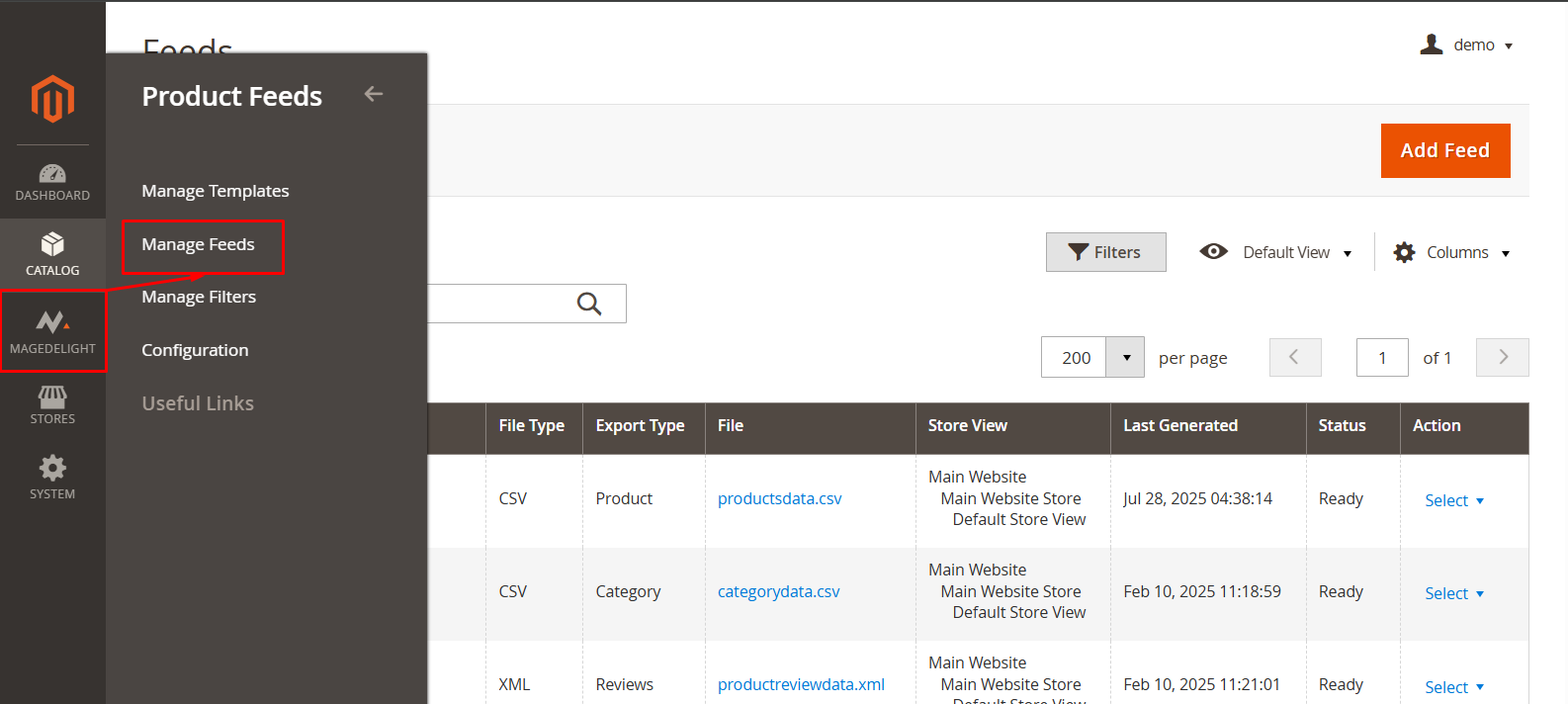
Step 2. Configure General Information
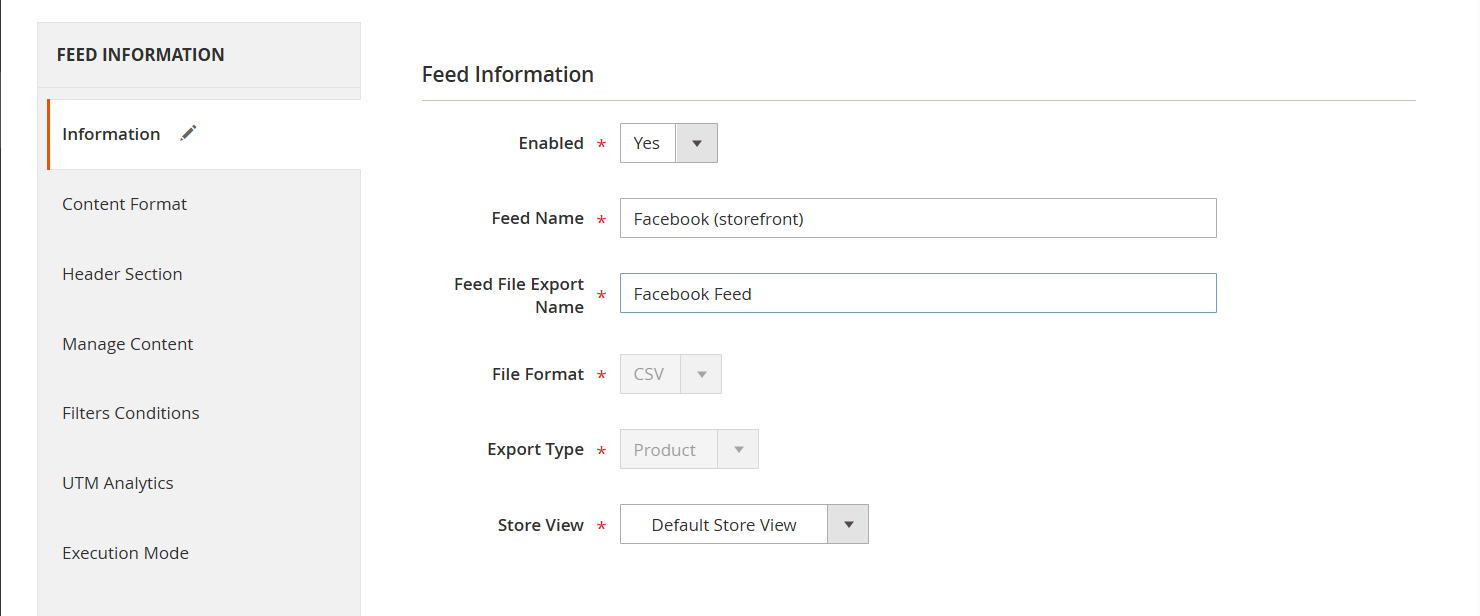
- Enter a name for your feed (e.g., Facebook Feed)
- Choose the store view
- Set status to “Enabled”
- Define file name and format (CSV, XML, or TXT)
Step 3. Choose the Facebook Template
Select the Facebook Product Feed Template. Most extensions include pre-built templates that align with Facebook’s requirements.
Step 4. Set Google Analytics Parameters
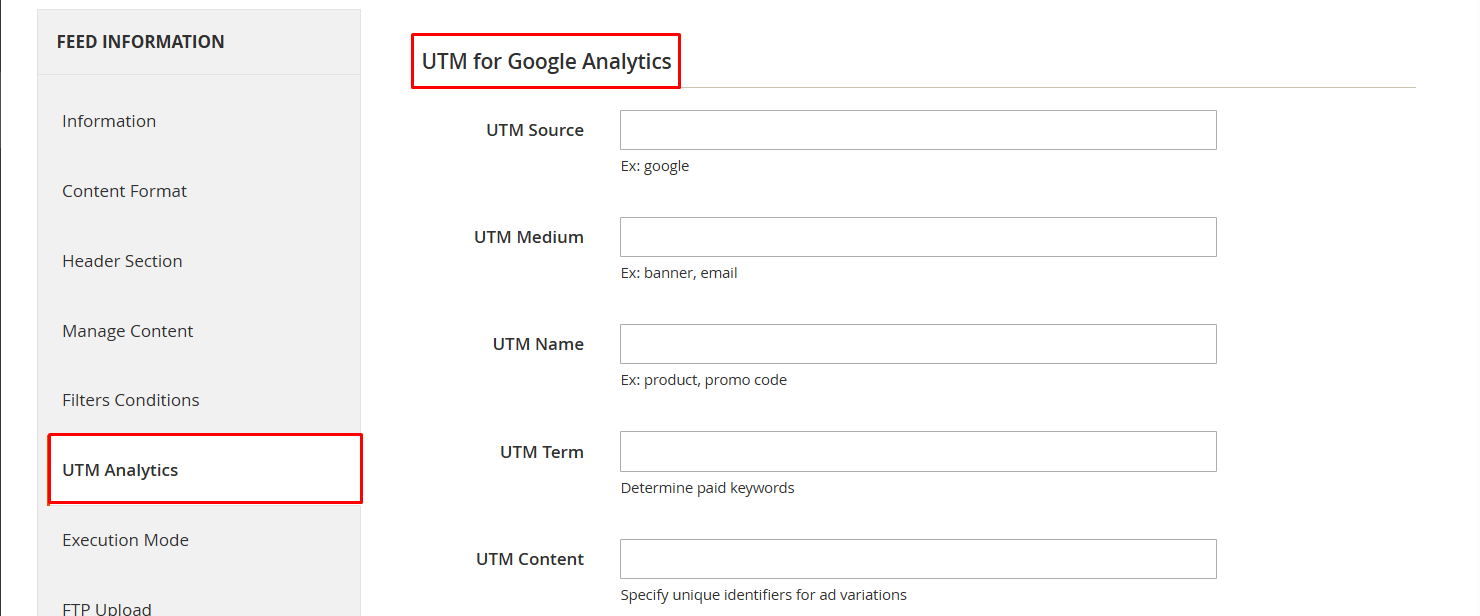
Add UTM parameters for tracking your Facebook campaigns, such as:
- Campaign Source: facebook
- Campaign Medium: social
- Campaign Name: dynamic_ads
Step 5. Apply Product Filters

Define product conditions (e.g., include only in-stock or specific categories).
Step 6. Configure Upload Protocol
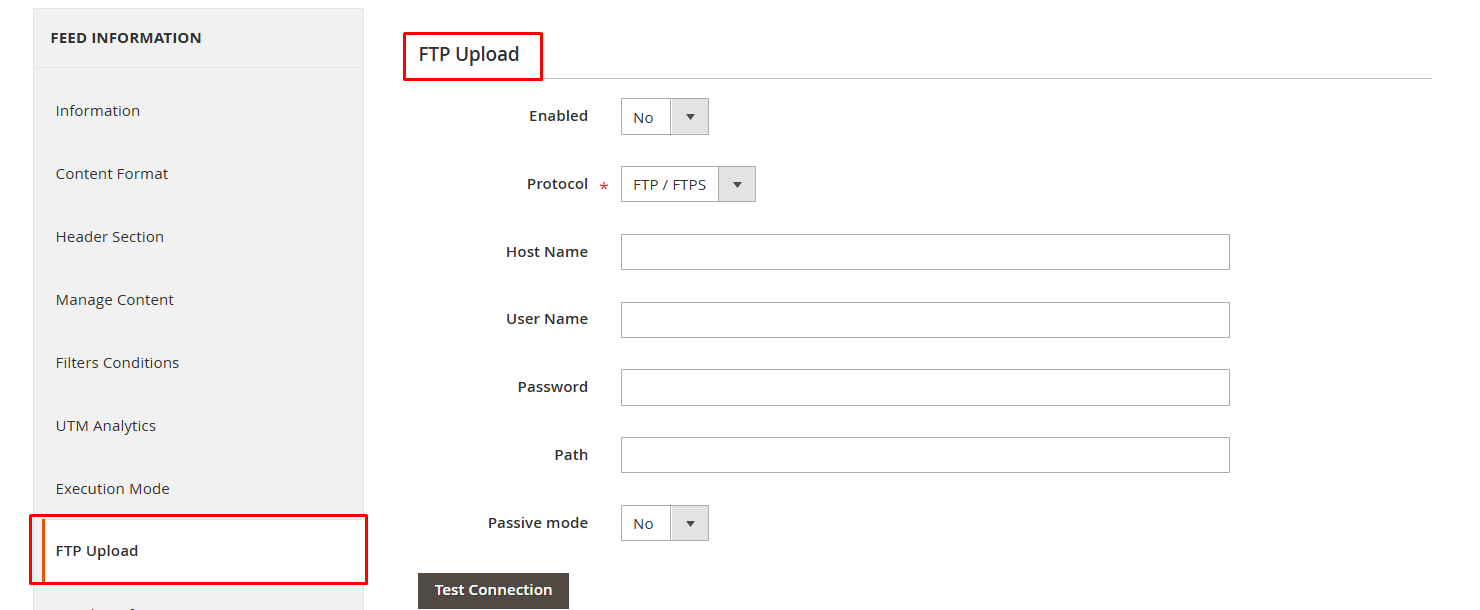
Select the method for feed delivery:
- Manual download
- FTP/SFTP
- Scheduled Cron job for automatic updates
Step 7. Generate the Feed
Click “Save and Generate” to export your product feed.
Your feed file is now ready to upload to Facebook.
How to Upload the Facebook Product Feed to Facebook Catalog?
Once your feed file is generated, follow these steps:
- Go to Facebook Commerce Manager → Catalogs → Add Catalog.
- Choose the Business Account and click Create.
- Under Upload Products, select Use Data Feeds.
- Choose the upload method:
- File Upload (manual)
- Scheduled Feed (recommended for auto-updates)
- Google Sheets
- Enter your feed URL or upload the file.
- Confirm settings like currency and update schedule, then click Upload.
Once the upload is complete, Facebook will process the feed, and your products will appear in your Facebook Shop and Ads Manager.
Top Magento 2 Facebook Product Feed Extensions
Here are the most reliable extensions to generate and manage Facebook feeds:
1. Advanced Product Feeds for Magento 2 by MageDelight
The Advanced Product Feeds for Magento 2 is all-in-one solution to generate, customize, and manage product feeds for Facebook, Instagram, Google Shopping, Bing, and more.
- Supports XML, CSV, and TXT formats.
- Automates feed scheduling and uploads.
- Provides prebuilt templates for major platforms.
- Enables dynamic product updates and filtering.
2. Amasty Facebook Product Feed
- Create and schedule unlimited feeds.
- Pre-built templates for Facebook, TikTok, and Pinterest.
- Real-time synchronization and multi-store view support.
3. Mirasvit Facebook Product Feed
- Supports custom templates and conditions.
- Schedule automated feed generation.
- Compatible with all major shopping platforms.
4. Plumrocket Facebook Product Feed
- 15+ pre-designed templates.
- Customize feeds using 50+ visual tags.
- Automatic updates and multi-language support.
Each of these Magento Facebook feed extensions makes feed generation simple, accurate, and scalable for all product types.
Best Practices to Optimize Your Facebook Product Feed
Follow these proven tips to improve your feed performance and ad quality:
| Best Practice | Why It Matters |
| Use High-Quality Images | Clear images attract clicks and meet Facebook’s ad standards. |
| Optimize Product Titles | Include brand, color, and key features. Ex: “Red Leather Handbag – Women’s Tote” |
| Keep Descriptions Accurate | Avoid fluff; focus on key attributes and benefits. |
| Enable Automatic Updates | Prevents outdated pricing or stock information. |
| Localize Feeds | Use multi-language and currency options for different regions. |
| Use Custom Labels | Tag items as “Bestsellers” or “Sale” for dynamic ad targeting. |
| Follow Facebook Guidelines | Avoid rejection by ensuring data accuracy. |
Implementing these practices helps you deliver a consistent and optimized shopping experience across Facebook’s ecosystem.
Common FAQs
1. What is the purpose of a Facebook product feed in Magento 2?
It allows you to sync your Magento store’s product data with Facebook for Dynamic Ads, Shops, and Instagram Shopping.
2. Can I automate product updates in the feed?
Yes, most Magento 2 Facebook Product Feed extensions support scheduled updates using Cron jobs.
3. What file format should I use?
Facebook supports CSV, XML, and TSV formats. XML is preferred for large catalogs.
4. Can I include configurable products in my feed?
Absolutely. You can include all product types—simple, configurable, grouped, or bundled.
Final Thoughts
Setting up a Facebook product feed in Magento 2 is one of the most effective ways to expand your digital reach. By using a reliable Magento 2 Facebook feed extension, automating updates, and following Facebook’s best practices, you can ensure your products stay visible, relevant, and appealing to the right audience — driving more clicks, conversions, and growth.
